Missing Download Arrow icon on iPad Mini5
I have an iPad mini (5th generation) running OS 13.5.1. It has Firefox, recently updated to v26.0, usually running with duckduckgo.
My problem is that the download icon doesn't appear. There's just the address window and, to the right of it, the library icon and the settings icon. Could this be because the iPad mini has such a small screen? Anyway, I just can't download anything in consequence. Help please on to how to download and/or install the download icon.
With thanks, B35
所有回覆 (2)
Hi B35, please ignore the unofficial support solicitation that someone posted. We have no idea where that leads and don't want you to get scammed.
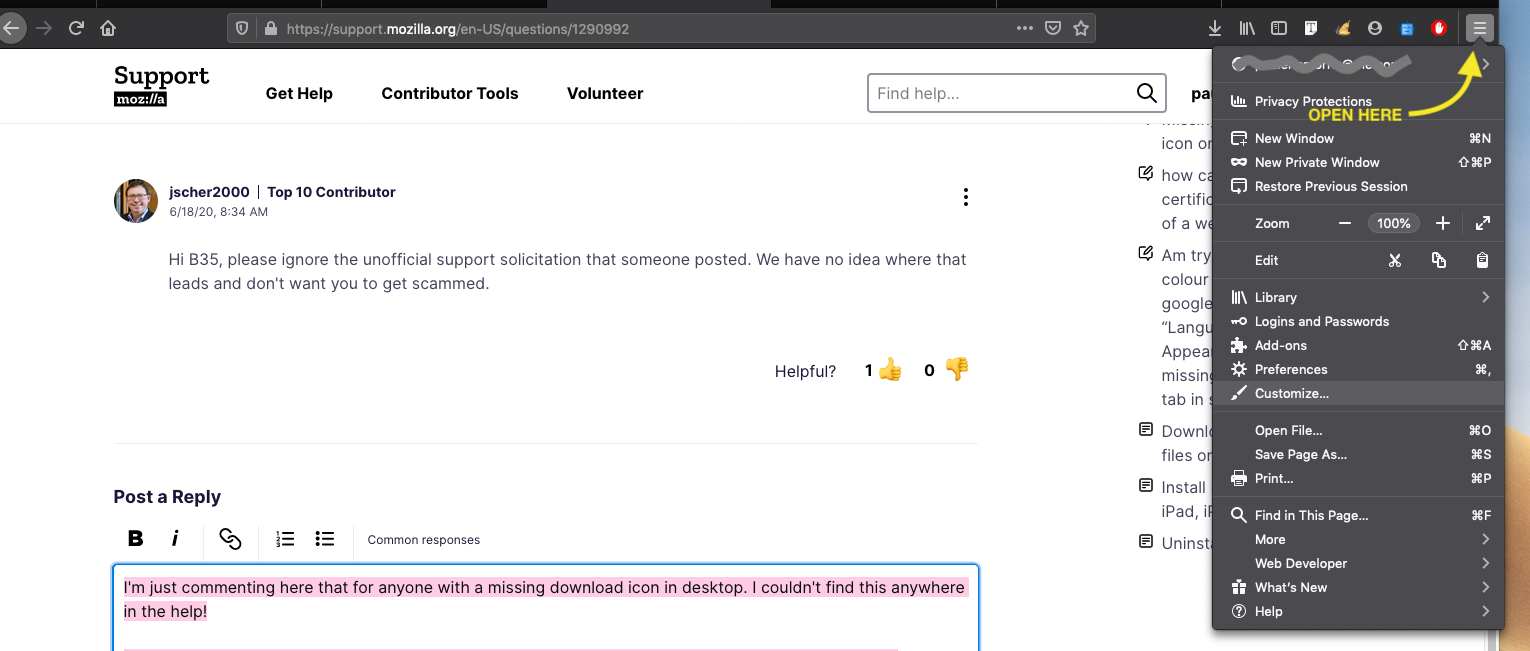
I'm just commenting here that for anyone with a missing download icon in desktop. It might work on ipad I'm not sure. I couldn't find this anywhere!
OPEN MENU (hamburger icon dropdown) > CUSTOMIZE. Then you can restore default bar or drag the download icon back onto you firefox toolbar.