


How to force Firefox to remember a password?

Firefox help says "When you enter a username and password that you haven't already saved for a website, Firefox will ask if you want to save it. "
But it doesn't always. I want it to remember username/password for a particular website, but Firefox doesn't ask. I have "Ask to save logins and passwords for websites" checked, and the website is not on my saved logons list. Is there a way to force Firefox to remember the username/password for a particular site, perhaps by manually editing the saved logons list (where is it?)? Thanks.
選擇的解決方法
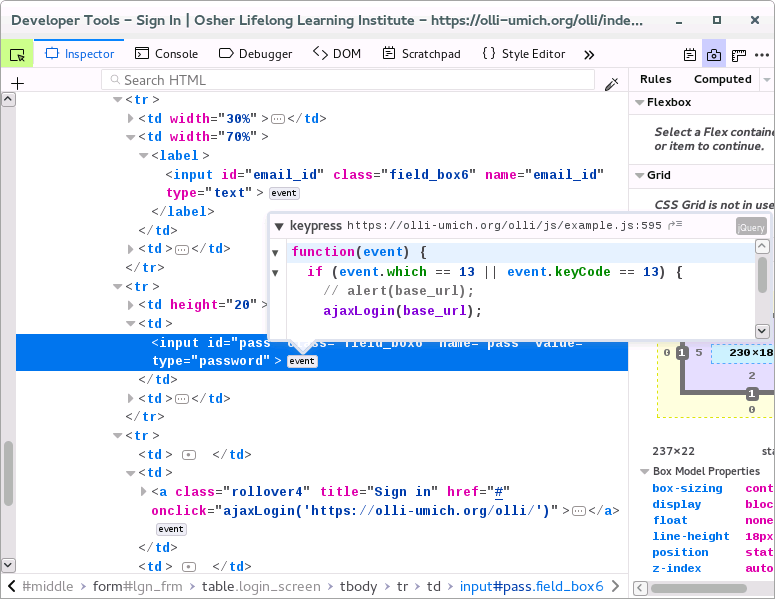
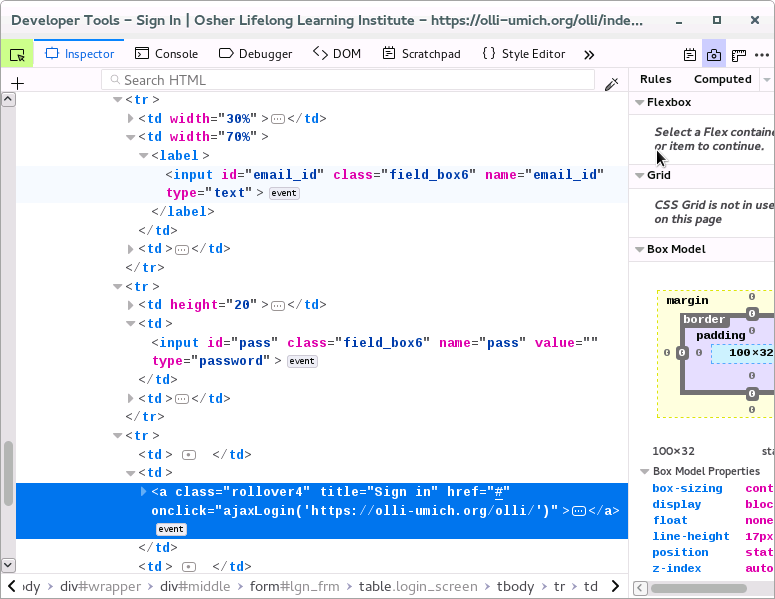
That login form consists of a few DIV elements with an input element (i.e. no FORM tag with a action). The input elements have an onclick handler (ajaxLogin) to the Enter and Submit action. Maybe that is why it doesn't work.
由 cor-el 於 修改
所有回覆 (11)
Some websites prevent inputs from being saved or autocompleted. If the form element or the input field has the autocomplete attribute set to off, you can't save your credentials.
I see - that's probably the problem. Thanks for the info.
Current Firefox releases shouldn't obey autocomplete for quite some time (by default signon.storeWhenAutocompleteOff = true), so it is likely that something else is causing this. It might either be that Firefox has a problem with recognizing the login form or there is some script active that modifies the login form or otherwise transfers form data to other fields.
OK, again thanks. FWIW, I've tried running Firefox in Safe Mode and still have the problem. Also, I checked and signon.storeWhenAutocompleteOff is set to true.
It's too bad there isn't some way of telling Firefox that the current website is indeed a login form and that you want it to remember username and password for it.
Can you post a link to a publicly accessible page (i.e. no authentication or signing on required)?
Here is the sign-in page: https://olli-umich.org/olli/index.php/member/welcome
選擇的解決方法
That login form consists of a few DIV elements with an input element (i.e. no FORM tag with a action). The input elements have an onclick handler (ajaxLogin) to the Enter and Submit action. Maybe that is why it doesn't work.
由 cor-el 於 修改
Thanks for looking at it. I'll try to forward your description to the webmaster and suggest they make the login more compatible with password savers.

I've found many forms have this issue. If you're competent with Javascript, you can often go into the Console, locate the `form` element, and `.submit()` it manually, which may give you the prompt you seek. Often the command to run is simply `document.querySelector('form').submit()`.
In the case of this question there is no form element present. There are only input fields for name and password and a button to submit this data via JavaScript (AJAX).
Sometimes even wrapping <input> fields in <form> may not help. You can try to remove all JavaScripts from a website using Inspector - <script> tags. It helps in some cases. Good luck.