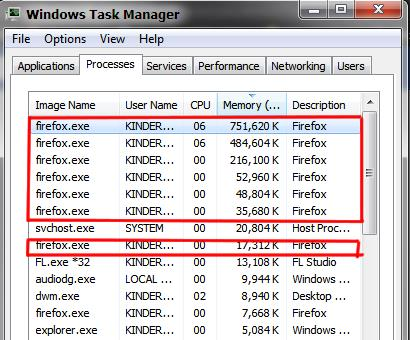
firefox eat too much memory

this problem occure since last update with new logo inside i've used firefox since 2008 have ready up my pc. but this time its really, firefox eat to much RAM my pc almost not move i open only 2 tabs
fix issues please
所有回覆 (4)
Go to the Firefox 3 Bar Menu --> Help ? --> Troubleshooting Information Page and take a look in the Accessibility section if accessibility is set to "true" there. if yes, go to the Firefox 3 Bar Menu --> Options --> Privacy & Security panel and under Permissions check the setting to Prevent Accessibility Services from accessing your browser.
Update your Video Card Drivers.
Please let us know if this solved your issue or if need further assistance.
After opening Firefox even in the safe mode memory uses climbs throughout the day and slows down my computer... I have tried everything I found in suggestions to correct this I am about to abandon Firefox for Chrome or other browser as this is untenable.
I have been loyal to Firefox since it's beginning
oh my god
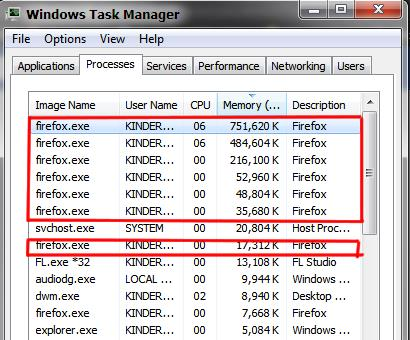
beiebbe said
this problem occure since last update with new logo inside i've used firefox since 2008 have ready up my pc. but this time its really, firefox eat to much RAM my pc almost not move i open only 2 tabs fix issues please