


Thunderbird 38.5.1 calendar no longer appears, nor is it shown in the File pull down or <ctr> i

Thunderbird downloaded the newest version, but I can't find my sidebar events calendar anywhere. The cog circle is gone, and it doesn't appear in the pull down <File> menu.
所有回覆 (7)
Did you just update to 38.5.1. If so, this will probably fix your problem.
- On the toolbar
 then
then 
- Select extensions and remove the Lightning (calendar) addon
- Restart Thunderbird
- Reinstall Lightning/calendar addon - if you need the functionality
Please tell us, does that help?
Note
- If you can't get to Add-ons, then start Thunderbird in safe mode by holding the shift key while starting Thunderbird.
- If you still can't get to Add-ons, simply reinstall Thunderbird from http://getthunderbird.com/
I wasn't using Lightning, I was just using the simple events calendar that appeared as a sidebar on the right side of Thunderbird.
same applies, just substitute the whatever you call the add-on for your function for lightning
Thanks, but as far as I know it wasn't an add-on program. It was something that appeared in Thunderbird a few weeks ago, or at least that's when I first noticed it. I've clipped the Mozilla's website page, the part I'm missing is on the right hand side.
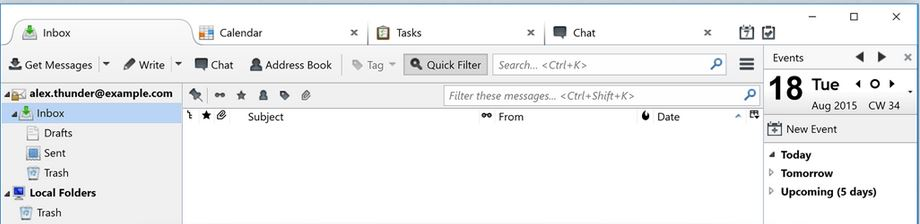
Forget all that, I did a shut down and restart and it's working now.
thanks for your help.
that is lightning in the image your showing..
