


Mozilla Firefox Desktop browser occupy too much memory

Hello Sir/Madam,
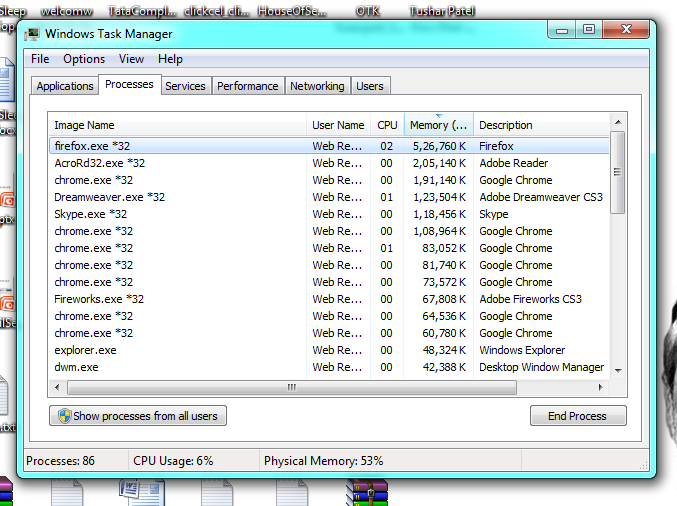
I am using Firefox Version 39.0 and even older version occupy too much memory. I have tried with same tabs, for example open same tab in chrome and firefox even though firefox occupy too much memory. Please refer this screenshot. http://prntscr.com/7oaxam
Also I have check this issue not only my laptop but I checked in 5-6 systems.
-Thanks, Tushar Patel
由 philipp 於 修改
所有回覆 (2)
Please consider to read this article which may help you: Fix Firefox using too much memory or CPU resources
Another point is this days modern browsers uses extra RAM and it's true. If you carefully see your screenshot, Firefox is consuming 526,760 K memory in one single process. But another modern browser Chrome is running on 7 different process. Which is in total consuming 782,222 K memory.
hi, your screenshot shows that firefox is using 526k while chrome is using 660k for the same tabs (you have to combine its processes for a proper comparison). those are normal values for modern browsers and you should only bother about memory usage once memory starts leaking (constantly increasing) or ram isn't freed once other programs need to make use of it.