


security.warn

Hello,
i use Firefox in Version 36. How can i disable security warning about leaving https-Site? I found something about security.warn-Flag in about:config/pref.js , but nothing below help so far: user_pref("security.warn_entering_secure", false); user_pref("security.warn_entering_weak", false); user_pref("security.warn_leaving_secure", true); user_pref("security.warn_leaving_weak", false); user_pref("security.warn_submit_weak", false); user_pref("security.warn_submit_insecure", false); user_pref("security.warn_submit_secure", false); user_pref("security.warn_viewing_mixed", false);
Do u have any idea?
Regards Evgenij
所有回覆 (5)
There is a message that appears when a secure page posts form data to an insecure page. As far as I know, that particular message does not have an option to disable. However, I haven't checked in several versions... some older threads about that warning:
Oops, I meant to ask for the specific wording of the error you are getting. if it's a hassle to type out, you could attach a screen shot to your reply.
Also, version 36 is not secure; Mozilla discloses security flaws after each new release. Is something holding you back from upgrading to Firefox 38.0.1? Please let us know so we can suggest solutions or workarounds.
jscher2000, security warning is in german, it's about sending the information unsecure - see screen below. We cannot upgrading to v. 38, cause we are using special programmed enviroment for us in version 36. regards
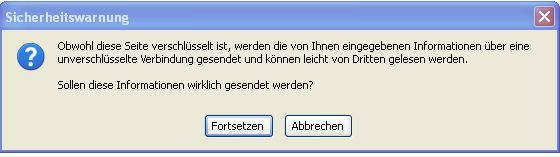
That message should only appear when an HTTPS page does a POST to an HTTP page. In some cases, you will have filled out the form yourself, so it is obvious why you are getting the message. In other cases, a script may be generating the form submission, sometimes after a redirect. Either way, I do not know of a way to disable that message.
Thanks anyway