


attachment not recognized

I receive weekly order info form a customer. In this mail there is a attachment in a zip file. But it is not recognized. see below
--===============1209493533269738915== Content-Type: application/octet-stream MIME-Version: 1.0 Content-Transfer-Encoding: base64 Content-Disposition: attachment; filename="Transportbedrijf van den Boogaard BV.zip"
UEsDBBQAAAAIALcAWUbzv/rEqAwAAAA6AAAoACQAVHJhbnNwb3J0YmVkcmlqZiB2YW4gZGVuIEJv b2dhYXJkIEJWLnhscwoAIAAAAAAAAQAYAICB4c2OUNABgIHhzY5Q0AGAgeHNjlDQAe1ba2wcVxU+
選擇的解決方法
yes, thank you i could figure out myself but that seem to be the problem, the sender of these mails does not add the right code in the mail file. probably it should be application/x-zip-compressed;
and not application/octet-stream
regards
所有回覆 (6)
Is it just this zip-file or all attached zip-files? If its all attached zip-files then first take a look at option / attachments and see if zip is registered there. Delete that line and try to open a zip-attachment again. this time you should get a question what to open with and an oportunity to make all attached-zip's use that program.
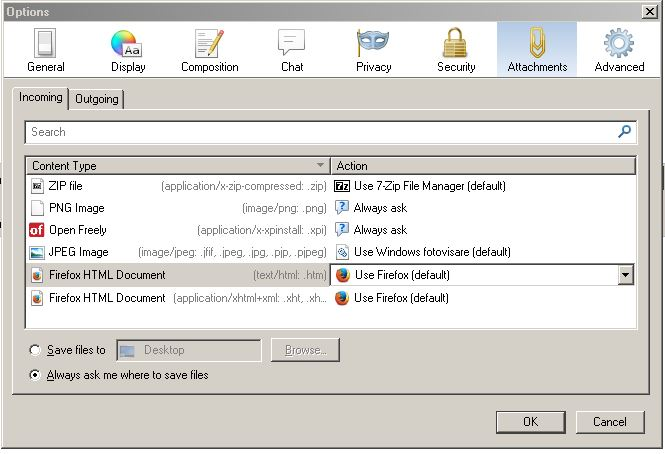
由 Gnospen 於 修改
Hello Gnospen,
On the first line of my menu I see File / Edit / View / Go / Message / Tools / Help
There is no Option there .....
Opening the message item, i can see Attachments but this is grey'ed out.
Your screen looks like FireFox not Thunderbird to me.
regards Han
That is definitely the options screen for Thunderbird.
From the menu bar select Tools-Options-Attachments-Incoming
No menu bar? Press the alt key. Try exploring the menu system. You might find something useful.
Hello Gnospen,
I work on a Suse Linux system and there the option item in the tools menu is not ther. On a windows machine it is. When I open a message with an attachment, then de atachment option under View is also lit up. BUT ......
The zip attachment from this sender is not recognized. So there is no attachment in my mail. Only the hex code, when you look to the message source.
regards
I stopped using Ubuntu when they changed the interface. Now I'm stuck with Win 7 Do you have a three bars icon? In Windows you can find options there. You didn't tell us if its a one of or not. What is your program to view zip-files? When I compare yours to my source code you see that the content-type isn't the same
080101080705060700050103
Content-Type: application/x-zip-compressed;
name="blat323_32.full.zip"
Content-Transfer-Encoding: base64 Content-Disposition: attachment;
filename="blat323_32.full.zip"
UEsDBAoAAAAAAFF8U0UAAAAAAAAAAAAAAAAIAAAAYmxhdDMyMy9QSwMECgAAAAAA871TRQAA
選擇的解決方法
yes, thank you i could figure out myself but that seem to be the problem, the sender of these mails does not add the right code in the mail file. probably it should be application/x-zip-compressed;
and not application/octet-stream
regards