


Windows 10 reached EOS (end of support) on October 14, 2025. For more information, see this article.

搜尋 Mozilla 技術支援網站

防止技術支援詐騙。我們絕對不會要求您撥打電話或發送簡訊,或是提供個人資訊。請用「回報濫用」功能回報可疑的行為。

了解更多

I'd like to know how to remove the upside down triangle history

  • 2 回覆
  • 1 有這個問題
  • 1 次檢視
  • 最近回覆由 cor-el

更多選項

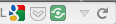
I don't remember seeing the upside down triangle in the location bar before. Is it something I can remove?

I tried to add a screen shot, but I couldn't figure out how to do that.

I don't remember seeing the upside down triangle in the location bar before. Is it something I can remove? I tried to add a screen shot, but I couldn't figure out how to do that.

被選擇的解決方法

That drop down marker has always been there and will show items that you have types or pasted in the location/address bar ordered by frecency (recently and frequently visited sites). It is possible to hide this icon if you really want to.

Add code to the userChrome.css file below the default @namespace line.


@namespace url("https://www.mozilla.org/keymaster/gatekeeper/there.is.only.xul"); /* only needed once */

.urlbar-history-dropmarker { display:none!important; }

The customization files userChrome.css (user interface) and userContent.css (websites) are located in the chrome folder in the Firefox profile folder.

You can use this button to go to the currently used Firefox profile folder:

  • Help > Troubleshooting Information > Profile Directory: Show Folder (Linux: Open Directory; Mac: Show in Finder)
  • Create the chrome folder (lowercase) in the <xxxxxxxx>.default profile folder if this folder doesn't exist
  • Use a plain text editor like Textedit on Mac to create a (new) userChrome.css file in the chrome folder (file name is case sensitive)
  • Paste the code in the userChrome.css file in the editor window
  • Make sure that the userChrome.css file starts with the default @namespace line
從原來的回覆中察看解決方案 👍 1

所有回覆 (2)

更多選項

This is the screen shot I was talking about.
更多選項

選擇的解決方法

That drop down marker has always been there and will show items that you have types or pasted in the location/address bar ordered by frecency (recently and frequently visited sites). It is possible to hide this icon if you really want to.

Add code to the userChrome.css file below the default @namespace line.


@namespace url("https://www.mozilla.org/keymaster/gatekeeper/there.is.only.xul"); /* only needed once */

.urlbar-history-dropmarker { display:none!important; }

The customization files userChrome.css (user interface) and userContent.css (websites) are located in the chrome folder in the Firefox profile folder.

You can use this button to go to the currently used Firefox profile folder:

  • Help > Troubleshooting Information > Profile Directory: Show Folder (Linux: Open Directory; Mac: Show in Finder)
  • Create the chrome folder (lowercase) in the <xxxxxxxx>.default profile folder if this folder doesn't exist
  • Use a plain text editor like Textedit on Mac to create a (new) userChrome.css file in the chrome folder (file name is case sensitive)
  • Paste the code in the userChrome.css file in the editor window
  • Make sure that the userChrome.css file starts with the default @namespace line