


Why do my tabs intermittently keep changing from being beside to below the orange button? I want them to stay beside the orange button, to save a row of room on the screen.

Firefox 4.0 - tabs are below the orange button, I want them to stay beside it to save a row of space.
Ọ̀nà àbáyọ Tí a Yàn
You get the tabs on the title bar if you maximize the Firefox window.
You can also look at the pref browser.tabs.drawInTitlebar on the about:config page.
All Replies (7)
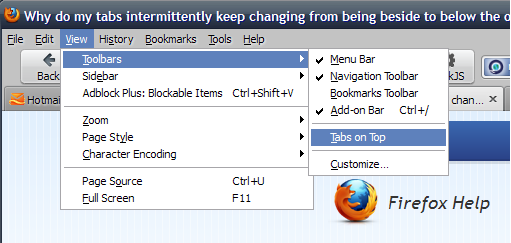
Do you have Tabs_on_top checkmarked? If it's not checkmarked, tabs will drop below the buttons. See screenshot.
I do have tabs on top checkmarked... here's how it looks (see photo).... The tabs were beside the orange button before...
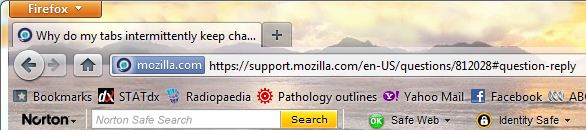
OK, I see what you mean now.
Can you try running Firefox in Use Troubleshoot Mode in Firefox please. If it functions properly in that configuration, then one of your add-ons is the culprit.
Unfortunately it appears the same in safe mode...
OK, it sounds like you've got another toolbar up there. So go to View | Toolbars | Customize. You'll see a panel open which should also reveal any additional toolbars which have been added. You can drag that into that panel which will remove it from the top.
Ọ̀nà àbáyọ Tí a Yàn
You get the tabs on the title bar if you maximize the Firefox window.
You can also look at the pref browser.tabs.drawInTitlebar on the about:config page.
That's fixed it! Didn't notice my FF had be minimised! Thanks.