


Missing edit payment methods button within the privacy and security section of settings

ive searched every article from here and beyond, but i cannot seem to find the button to edit my payment information. strange since it still prompts to autofill it
All Replies (3)

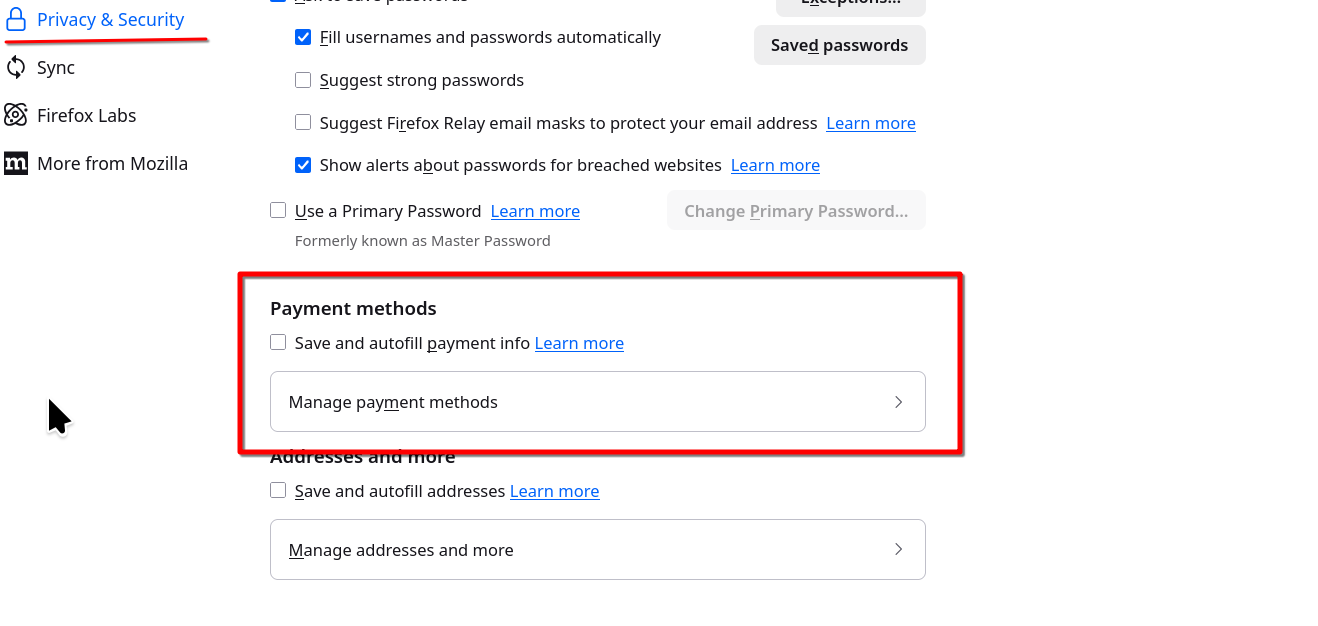
Post a similar screenshot. see my screenshot Where did you get Firefox? What security software besides MS Defender are you running? What country are you in?
Ọ̀nà àbáyọ Tí a Yàn
The marked section on the screenshot wasn't there for me, I was able to fix it by typing about:config in the URL bar, finding the settings "extensions.formautofill.creditCards.supportedCountries" and "extensions.formautofill.addresses.supportedCountries" and adding my country code to BOTH of them. Some said only doing this with the "creditCards" one was enough, but I needed both.
DJ_SANYEE said
The marked section on the screenshot wasn't there for me, I was able to fix it by typing about:config in the URL bar, finding the settings "extensions.formautofill.creditCards.supportedCountries" and "extensions.formautofill.addresses.supportedCountries" and adding my country code to BOTH of them. Some said only doing this with the "creditCards" one was enough, but I needed both.
this was indeed what fixed it! Thank you DJ_SANYEE