


Windows 10 reached EOS (end of support) on October 14, 2025. For more information, see this article.

Search Support

Avoid support scams. We will never ask you to call or text a phone number or share personal information. Please report suspicious activity using the “Report Abuse” option.

Learn More

Èròjà atẹ̀lélànà yii ni a ti fi pamọ́ fọ́jọ́ pípẹ́. Jọ̀wọ́ béèrè ìbéèrè titun bí o bá nílò ìrànwọ́.

Firefox 127.0.2 64 bit on Windows 10 not closing

  • 1 èsì
  • 1 ní ìṣòro yìí
  • 49 views
  • Èsì tí ó kẹ́hìn lọ́wọ́ SK

more options

I've been out of town. After returning home Firefox updated to 127.0.2 but now it will not close its process when I close its window. When I try to launch Firefox again I get the error message below and attached:

"Firefox is already running, but is not responding. The old Firefox process must be closed to open a new window. <Close Firefox> <Cancel>"

When I select "Close Firefox" the new Firefox window will then launch. However, if I open any web page the same error occurs after closing the window.

If I launch Firefox and then close it without opening a web page I do not get the error the next time I launch. Somehow going to any web page in Firefox prevents that instance of Firefox from closing.

I'm running Windows 10 22H2 Build 19045.4529 and it's shown as up-to-date.
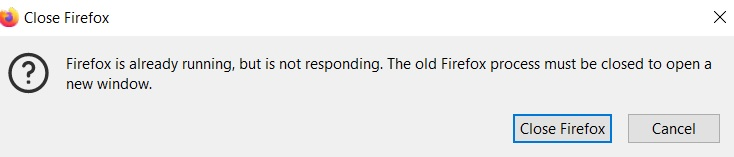
I've been out of town. After returning home Firefox updated to 127.0.2 but now it will not close its process when I close its window. When I try to launch Firefox again I get the error message below and attached: "Firefox is already running, but is not responding. The old Firefox process must be closed to open a new window. <Close Firefox> <Cancel>" When I select "Close Firefox" the new Firefox window will then launch. However, if I open any web page the same error occurs after closing the window. If I launch Firefox and then close it without opening a web page I do not get the error the next time I launch. Somehow going to any web page in Firefox prevents that instance of Firefox from closing. I'm running Windows 10 22H2 Build 19045.4529 and it's shown as up-to-date.
Ìsopọ̀ yíyà aṣàfihàn

All Replies (1)

more options

OK, I found the fix. I signed out from my Firefox profile, then signed in again. It appears to have been an issue with re-syncing devices after the latest update.