Denc nañu waxtaan wii.
Yónneel yeneen laaj soo soxlaa ndimbal.

Solved
Yiñ denc
How to enable default spell checking in Firefox 35?
I am using Firefox 35. Somehow default spell checking got turned off, and I want to turn it back on permanently. I can turn it on for a single text box by right-clicking and choosing "Check Spelling" but that setting does not endure.
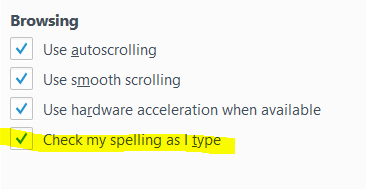
Update: The answer is Tools >> Options >> Advanced >> General >> Check my spelling as I Type
https://support.mozilla.org/en-US/kb/how-do-i-use-firefox-spell-checker
I am using Firefox 35. Somehow default spell checking got turned off, and I want to turn it back on permanently.
I can turn it on for a single text box by right-clicking and choosing "Check Spelling" but that setting does not endure.
Update: The answer is Tools >> Options >> Advanced >> General >> Check my spelling as I Type
https://support.mozilla.org/en-US/kb/how-do-i-use-firefox-spell-checker
Rich Pasco moo ko soppali ci
All Replies (1)

Saafara yiñ Tànn
see this goto Option>Advance>General see screen shot now tik on it