


Where do I find my starred articles
Where do I find my starred articles
Усі відповіді (1)

Hi,
When you star/bookmark a webiste, it will usually add it to the Bookmarks Toolbar, but sometimes it isn't visible. Try pressing Ctrl+Shift+B to toggle the Bookmarks Toolbar on and off. It should appear directly under the URL bar.
If you don't see the bookmark you're looking for, you can press Ctrl+B to open a sidebar with a list of all of your bookmarks, organized into folders.
When creating or editing a bookmark by pressing the star icon, make sure to set the Location of the bookmark. The pop-up will have a dropdown for Location. Choosing Bookmarks Toolbar will add the bookmark to the bar that you can toggle.
If you can't find all of your bookmarks and bookmark folders in Firefox, try adding the Bookmarks Menu icon to your Bookmarks Toolbar (and then using it to access your bookmarks):
- Click the menu button
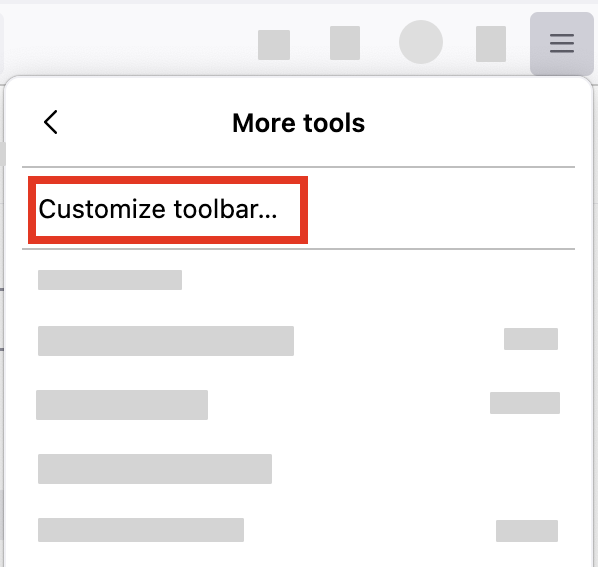
 , select "More tools" and click "Customize toolbar…"
- A special tab will open which allows you to drag and drop items in or out of the overflow menu and the toolbar.
-
- Drag the Bookmarks menu
 item to the toolbar.
- Click the Done button.
- Click on the Bookmarks menu icon. It will display all of your bookmarks. You might need to open the Bookmarks Toolbar, Bookmarks Menu, or Other Bookmarks folders to find the one you're looking for.
Let us know if this solves the problem!
- For other ways to customize Firefox, see Customize Firefox controls, buttons and toolbars.
- To learn more about Firefox bookmarks, see Bookmarks in Firefox.