


stop FF doing DNS lookup when I hover over a link

I start FF in safe-mode. I open a local page which includes only one URL. When I hover on this link I see (`tcpdump`) a DNS lookup being performed for this domain. I followed the suggestions from Mozilla but I still see this.
How do I stop this access.
I use FF "156.0 (64-bit)" on Fedora 44.
TIA
All Replies (18)
This is described in How to stop Firefox from making automatic connections section "Prefetching" › "Link prefetching" › "DNS prefetching": support.mozilla.org/en-US/kb/how-stop-firefox-making-automatic-connections#w_dns-prefetching
If the preferences documented there do not have any effect, it might be worth reporting either a pref bug, or a stale content at least. Thanks for checking.
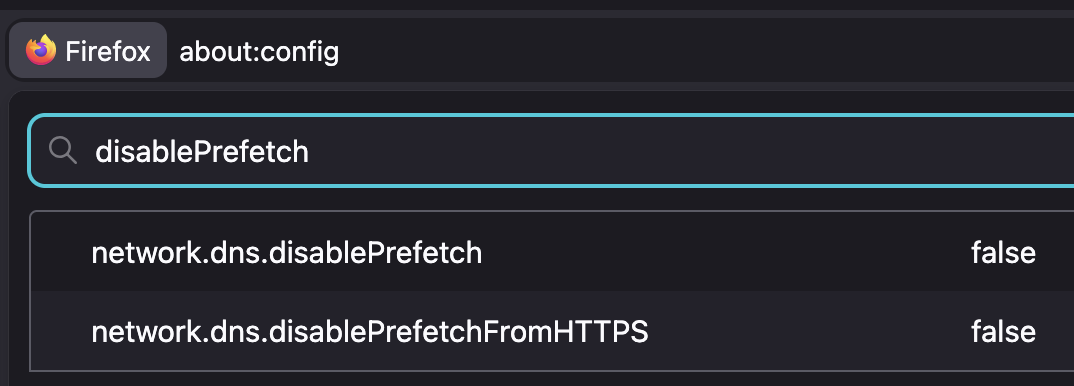
Modified by jbr
Yes, what how-stop-firefox-making-automatic-connections recommends was done. Surely I am not the first person to notice this?
I will appreciate hearing from other people doing the same. I simply run
$ sudo tcpdump -l port 53 -i eth1
where eth1 is the interface to my internet modem. Internal connections are on another interface.
I open this file
the conversation
[unfortunately the editor is hiding my actual text. How can I insert unmolested text???]
I then move the focus (the mouse) to another window and hover over the link, briefly, and immediately see
09:09:56.218995 IP e7.eyal.emu.id.au.52426 > h.gtld-servers.net.domain: 47967% [1au] HTTPS? theconversation.com. (60) 09:09:56.219101 IP e7.eyal.emu.id.au.59252 > 120.19.253.254.domain: 11696+ [1au] A? theconversation.com. (48) 09:09:56.219326 IP e7.eyal.emu.id.au.48388 > 120.19.253.254.domain: 3849+ [1au] A? theconversation.com. (48) 09:09:56.396917 IP 120.19.253.254.domain > e7.eyal.emu.id.au.48388: 3849 4/0/1 A 151.101.66.132, A 151.101.130.132, A 151.101.194.132, A 151.101.2.132 (112) 09:09:56.396917 IP 120.19.253.254.domain > e7.eyal.emu.id.au.59252: 11696 4/0/1 A 151.101.66.132, A 151.101.130.132, A 151.101.194.132, A 151.101.2.132 (112)
This is followed by many other probes, but I am only interested in the start of this activity which is timed exactly with the hover. Maybe an add-on is still active, despite the --safe-mode? Some of the probes may be from my local bind, listening to 192.168.3.7. My resolv.conf includes:
   nameserver 192.168.3.7
   nameserver 120.19.253.253
   nameserver 120.19.253.254
Modified by mozilla888
[deleted, was due to a submit error]
Modified by mozilla888
[Deleted, was due to a submit error]
Modified by mozilla888
Well that's not what you posted above "I open a local page which includes only one URL" — which I did to confirm the pref.
data:text/html,link <a href="https://example.net">here</a>
Default preload: https://pastes.io/LLUmuUqd After disabling: https://pastes.io/B4DbpNEn
So you're only interested in hearing back from those not having the pref make any difference? Aight so that's not me, ta-ra!
What are you referring to by "not what you posted above"? I wanted to include my small file but the editor removed parts of it. I now attached an image of the file. HTH.
I can see how your second log shows there is no domain probe. Good. This is what I want but not what I get.
Is it possible, that despite the --safe-mode, an add-on (e.g. Adblock Plus) is activated?
TIA

Ah, now I understand — the instructions read as to follow the rendered link and hover content there — not as there's a sample markup to use (hint: the wiki markup syntax is covered in Markup chart, you probably want to wrap code in nowiki tags as well).
I can only verify things like this in an isolated setup, so: new profile, not enrolling into any productivity features, blank home/tab, doh off, search provider off (set to custom localhost with no autocomplete endpoint, as default, others disabled) and then about:networking to flush caches and restart, and flush again — and then test.
So I'd recommend doing that outside of your normal browsing setup first, if you can confirm the difference — and then look for what is different in your common profile and reduce the functionality there to comparable experiment.
mkdir sacrificial && firefox --profile ./sacrificial --no-remote --new-instance … for completely throwaway launching;)
I logged a bug report at
https://bugzilla.mozilla.org/show_bug.cgi?id=2075933
and I am still trying to identify the reason for my issue.
The suggested use of a sacrificial profile works as expected, but with the same settings my daily profile continues to issue DNS queries.
Modified by mozilla888
Then I don't think it's a defect if a clean profile doesn't reproduce on your system — which is a good news, and only seems to be a matter of configuration.
There might be features that still rely on prefetching of their own, like potentially Preview webpages in Firefox with link preview but I'd assumed you've turned all similar things off when you're concerned about preloads?
I also think that I am missing an option or a setting. I do not have the mentioned "Enable link previews" feature. BTW AI is disabled.
So yes, I turned off everything I could think of, or found when searching.
Apart from using tcpdump to see the probes, is there a way to see a FF log that will show which feature is triggered on hover?
(Yes, that would be nuked with AI kill switch.)
If you get more familiar with the about:logging functionality in terms of adding modules and raising verbosity you might be able to track back the call sites from the networking logs if you want to investigate your profile case more closely. (Or, ask the developer on the bug how to best configure the modules and verbosity for that.)
https://firefox-source-docs.mozilla.org/networking/http/logging.html
OK, I need to learn about logging then.
Trying it with default setting (Networking preset).
After setting it, and having my test.html open, I wait quietly until 14:24:30 when I hover on the link.
I see this logged:
2026-09-29 14:24:30.201484 UTC - [Parent 653518: Main Thread]: D/nsHttp nsHttpHandler::NewProxiedChannel [proxyInfo=0]
2026-09-29 14:24:30.201551 UTC - [Parent 653518: Main Thread]: V/nsHttp Creating HttpBaseChannel @7f483cc99200
2026-09-29 14:24:30.201571 UTC - [Parent 653518: Main Thread]: D/nsHttp Creating nsHttpChannel [this=7f483cc99200, nsIChannel=7f483cc99240]
2026-09-29 14:24:30.201584 UTC - [Parent 653518: Main Thread]: E/nsHttp nsHttpChannel::Init [this=7f483cc99200]
2026-09-29 14:24:30.201597 UTC - [Parent 653518: Main Thread]: E/nsHttp HttpBaseChannel::Init [this=7f483cc99200]
2026-09-29 14:24:30.201609 UTC - [Parent 653518: Main Thread]: E/nsHttp host=theconversation.com port=-1
2026-09-29 14:24:30.201621 UTC - [Parent 653518: Main Thread]: E/nsHttp uri=https://theconversation.com/au
This is followed by many other records that then mention nsHostResolver.
But should there be ANY mention on the link (the conversation.com)?
I do not know yet how to see what caused the nameserver requests.
The logging pane should point you to the Profiler functionality profiler.firefox.com/docs in case you wanted to explore the call stacks in a hierarchical way (perhaps locally you'd see the most using a "debug" log preset?) — it might give away the call sites by name that could be telling to what the feature behind the trigger is?
Hi, I am reading about profiling, it is slow going. Can I provide a saved profiling run that shows the problem? Maybe it will be easy for you to see the cause. If I am asking for too much then just say so.
TIA
I don't think I could recognize the call sites; I'm not even sure what's the appropriate log level and modules to set for this — you might be able to tell iterating over the results and what's in the call tree.
An engineer on the bug would eventually guide you through some ideal setup to see where it's coming from.
Thanks,
I now elaborated the bug report
https://bugzilla.mozilla.org/show_bug.cgi?id=2075933
which may advance the issue.
I'm not sure if you mean a hosts file–based loopback domain, or a real fqdn host that you're just not mentioning (an example.com which has a link and both protocols available would also work if you're making a point that's not reproducible from your examples directly)
I do see a hit on the link when using non–HTTPS with both prefs turned on.
2026-10-03 11:14:28.445718 UTC - [Parent 51393: Socket Thread]: V/nsHttp nsHttpConnectionMgr::ProcessPendingQForEntry [ci=.S........H[tlsflags0x00000000]iana.org:443^partitionKey=%28https%2Ciana.org%29 ent=1438b5780 active=0 idle=1 urgent-start-queue=0 queued=0]
If I turn on only the one listed in the docs stated in the start of the thread, it works as expected. Sounds like a configuration issue on your side if you flip both disable and disableFromHTTPS — which might mean the latter takes precedence and only disables that just from HTTPS (I'll leave looking up the sources to you, as for me, it works with just the one documented setting).