


Moving profiles between Macs - different versions of Thunderbird and unable to update old one & .pdf - ing old emails

1. How to move mail between two different Macbooks with different OSX and different versions of Thunderbirds?
How do I move my email profiles (there are several) from an old Mac to a new one, when the old Mac can't be upgraded anymore and the Thunderbird versions don't match?
Old Macbook OSX Monteray 12.7.4 can not go any higher on OSX due to hardware not being compatible Thunderbird 140.5 Oesr 64 bit - don't know if it can be updated or not, but expect not. Minimizing run time as much as I can because the fan is going nuts and I think the battery is going - gets very hot.
I copied all the different profile folders from the Old Mac to an external drive. However, I don't think I can just plop them in to the new Profiles folder on the New Mac, given the Thunderbird versions and OSX version don't match.
New Macbook OSX Sonoma 14.1 Thunderbird 153.0.2 aarch64 Not updating to Tahoe yet because then I can't use my 2019 MS Office products - need to save up to update those first
All I need is e-mail - not calendars, contacts etc., although it might be nice to to have those Thanks in advance
2. How to .pdf old emails (With attachments) Also, the profiles folder is huge (219 GB), with multiple profiles and I want to save old emails (with attachments) into .pdf and appreciate advice on what .pdf converter/file converter would be best. It doesn't have to be free. It does need to respect my privacy.
All Replies (14)
Migration of your Thunderbird data from the old Mac to the new Mac can be done with simple copy and drag & drop actions. On your old Mac copy the entire folder "Thunderbird" from your user Library on an external hard drive with at least 250 GB memory. Plug the external HD to your new Mac, verify that Thunderbird is not running, open a Finder window, select your user Library and drag & drop the Thunderbird folder in your user Library. If you have already run Thunderbird on the new Mac the system will ask you to replace the already existing Thunderbird folder.
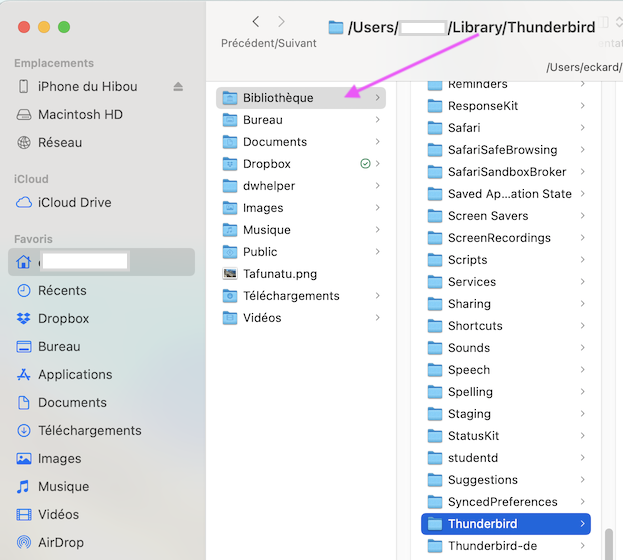
Modified by Mapenzi

Hi Caroline,
PDFs: I would preserve the messages in a format that is readable by e-mail apps because searching, sorting, filtering, filing, threading, opening attachments in preferred apps, et cet. can be done easily. Not much can be done with PDF files.
The ImportExportToolsNG add-on provides several format options, including PDF.
You can keep all your old messages in Thunderbird.
Rick said
You can keep all your old messages in Thunderbird.
I need to reduce the file size of the Profiles Folder because it is using half my disk space - have emails from decades ago. Mixed bag of local folders and multiple profiles used over the years makes the task a bit perplexing :) I'm ready to batch .pdf all the old ones with an attachment.
I use a similar method in which I keep about 150,000 messages outside Thunderbird. When I need to access some, I import a folder temporarily into Thunderbird.
Of course, you should do whatever works for you. My system would not work for you if you do not have an extensive folder system already.
I didn't think Thunderbird 140.5 oeser (Meadow) on the Old Mac with OSX Monteray 12.7.4 could be updated to Thunderbird 153..02 esr but it just worked. However, the New Mac has is 153.0.2 aarch64 while the Old Mac has 153.0.2 esr 64 bit Do they both need to be the same series? I.e. aarch64?
If I can confirm that they are now both on the same version, then I will copy the entire Thunderbird folder over to the New Mac's Library via an external drive. Does it matter if the portable drive is OSX format or EXFAT?
Mapenzi said
Migration of your Thunderbird data from the old Mac to the new Mac can be done with simple copy and drag & drop actions. On your old Mac copy the entire folder "Thunderbird" from your user Library on an external hard drive with at least 250 GB memory. Plug the external HD to your new Mac, verify that Thunderbird is not running, open a Finder window, select your user Library and drag & drop the Thunderbird folder in your user Library. If you have already run Thunderbird on the new Mac the system will ask you to replace the already existing Thunderbird folder.
Modified by caroline33
Rick said
I use a similar method in which I keep about 150,000 messages outside Thunderbird. When I need to access some, I import a folder temporarily into Thunderbird. Of course, you should do whatever works for you. My system would not work for you if you do not have an extensive folder system already.
Do you keep those other profiles on an external drive to save disk space on your device?
I keep the messages in a hierarchy of folders, not in Thunderbird profiles.
I keep them on my internal drive because I have space. I could easily keep them on an external drive, but have no need to.
The format of the external drive for the procedure that Mapenzi has suggested does not matter unless you have a single file that is larger than the maximum possible on exFAT. I forget what that is. 64 GB?
caroline33 said
I didn't think Thunderbird 140.5 oeser (Meadow) on the Old Mac with OSX Monteray 12.7.4 could be updated to Thunderbird 153..02 esr but it just worked. However, the New Mac has is 153.0.2 aarch64 while the Old Mac has 153.0.2 esr 64 bit Do they both need to be the same series? I.e. aarch64?
To be 100% sure download the Thunderbird 153.0.2 esr version from here https://archive.mozilla.org/pub/thunderbird/releases/153.0.2esr/mac/ , delete your actual Thunderbird 153.0.2 (release) version and install the esr version. All applications on macOS are 64bit versions.
caroline33 said
Does it matter if the portable drive is OSX format or EXFAT?
I'm not sure whether EXFAT would work with macOS. Maybe some other Mac user can answer this question.
Macs can use exFAT.
Hi The link takes me to a directory tree, and I've never done an download/install from a directory tree vs from a downloadable/executable/installer.
(I've deleted Thunderbird from the New Mac - moved to Trash).
I just discovered that I can download 153.0.2 esr by choosing a different channel during the download (forehead slapped) https://www.thunderbird.net/en-CA/thunderbird/all/ The names aren't quite the same, even so.
The New Mac now has 153.0.2esr (aarch64) installed. I'll go read the release notes. The Old Mac as 153.0.2 esr (64 bit)
I'm pretty sure the M3 is a Silicon processor and that the version is compatible. Perhaps I can call Apple Support to ask. There's lots of info on the internet. It certainly looks like it will work.
https://forums.appleinsider.com/discussion/234133/new-apple-silicon-has-arrived-with-m3-m3-pro-and-m3-max-chips/p2
https://www.thunderbird.net/en-US/thunderbird/153.0.2/system-requirements/ "Mac Recommended Hardware Macintosh computer with an Intel x86 or Apple Silicon processor 512 MB RAM 200 MB hard drive space additional hard drive space for mail storage
Modified by caroline33
The M3 is Apple Silicon. You don't have to worry about compatibility.
I recommend the esr channel.
I thought I posted a reply, but it isn't here. It must be, because Rick replied to it.
Recap: I discovered (embarrassed to say) that I can download esr by simply changing the channel selection
Old Mac Thunderbird Version 153.0.2esr (64-bit) installed New Mac Tunderbird Version Version 153.0.2esr (aarch 64) installed.
This is probably as close as I can get for matching versions.
Replaced the Thunderbird folder in the Library on the New Mac and Thunderbird Mail appears to be running on New Mac. will test it out for a while. Thank you, everyone!
Modified by caroline33
Rick said
I use a similar method in which I keep about 150,000 messages outside Thunderbird. When I need to access some, I import a folder temporarily into Thunderbird. Of course, you should do whatever works for you. My system would not work for you if you do not have an extensive folder system already.
I have an embarrassingly complex/layered folder system :) Not even sure what folder belongs to what profile anymore - but I'll figure it out now that I am up and running on a machine that isn't threatening to burst its (3rd) battery.