


Thunder Calendar repeat request Reprogram Email Reminders !

I've asked this before to no response. I JUST did a new search and found a users solution that I just tried to no avail. Which was to add the Provider for Google Calendar Extension, then unsubscribe and resubscribe to my Calendars! The old W7 version of the Calendar had the ability to have a Reminder EMAILED to oneself! That option with the new W11 version has disappeared! Can someone please ask the Coders to re include this option! THANK YOU! I 'LIVE" by this option! My Iphone 3rd party Calendar thankfully still has this option! But I would LOVE to have this back on my W11 Laptop in the Thunderbird Calendar!
Chosen Solution
Michel T just posted a FIX via a 'Step' that was missing from earlier instructions from another user. Which was/is
Unsubscribe from all ones Calendars by clicking on the 3 dots to the Right of each Calendar.
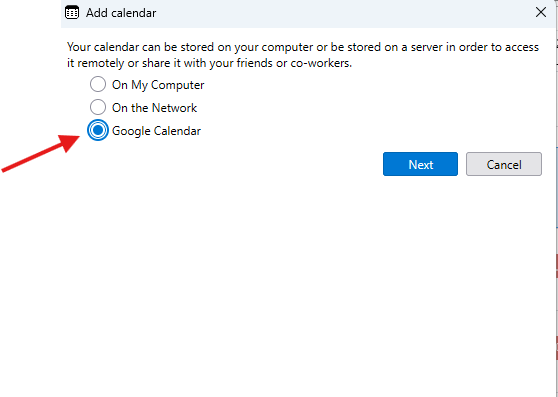
Then Install the Add On " Provider for Goggle Calendar " by going to TOOLS - ADDONS AND THEMES Then FILE - NEW - CALENDAR and here's where I goofed : Make sure to Select GOOGLE CALENDAR ! ( not Network ) !!!!
Then : auto find ones Calendars!
Select the ones you want and BINGO THE CHOOSE A REMINDER ACTION "SEND AN EMAIL" IS RESTORED !
thank you !!!!!!!!!!!!!!!!!!!!!!!!!! FANTASTIC !!!
All Replies (4)

I have Thunderbird 140 and 152 on my windows 11 and I don't have this problem.
Is it possible that you have more than 1 calendar and one of them is a local one ( not network : for example Google, yahoo etc ), and your default calendar is not the Network calendar.
HI MT Thank you for trying............but I'm not the only one.........
I only have the one calendar and it IS on the Network. It is Networked to my Google online Calendar. To repeat, My Phone 3rd party app can have an email reminder , but not Thunderbird Calendar
In order to have Email option as reminder for google calendar you need Add on "Provider for Google Calendar " installed and enabled.
I just added a new calendar as a test on Winows 11 with Thunderbird 152.0 and it did work.
When you add a Google Calendar you should see and select "Google Calendar"
When your Google Calendar Added the Calendar Location should looks like this : googleapi://<UserName>@gmail.com/?calendar=<UserName>%40gmail.com
Modified by Michel T
Chosen Solution
Michel T just posted a FIX via a 'Step' that was missing from earlier instructions from another user. Which was/is
Unsubscribe from all ones Calendars by clicking on the 3 dots to the Right of each Calendar.
Then Install the Add On " Provider for Goggle Calendar " by going to TOOLS - ADDONS AND THEMES Then FILE - NEW - CALENDAR and here's where I goofed : Make sure to Select GOOGLE CALENDAR ! ( not Network ) !!!!
Then : auto find ones Calendars!
Select the ones you want and BINGO THE CHOOSE A REMINDER ACTION "SEND AN EMAIL" IS RESTORED !
thank you !!!!!!!!!!!!!!!!!!!!!!!!!! FANTASTIC !!!