


Localization error in settings

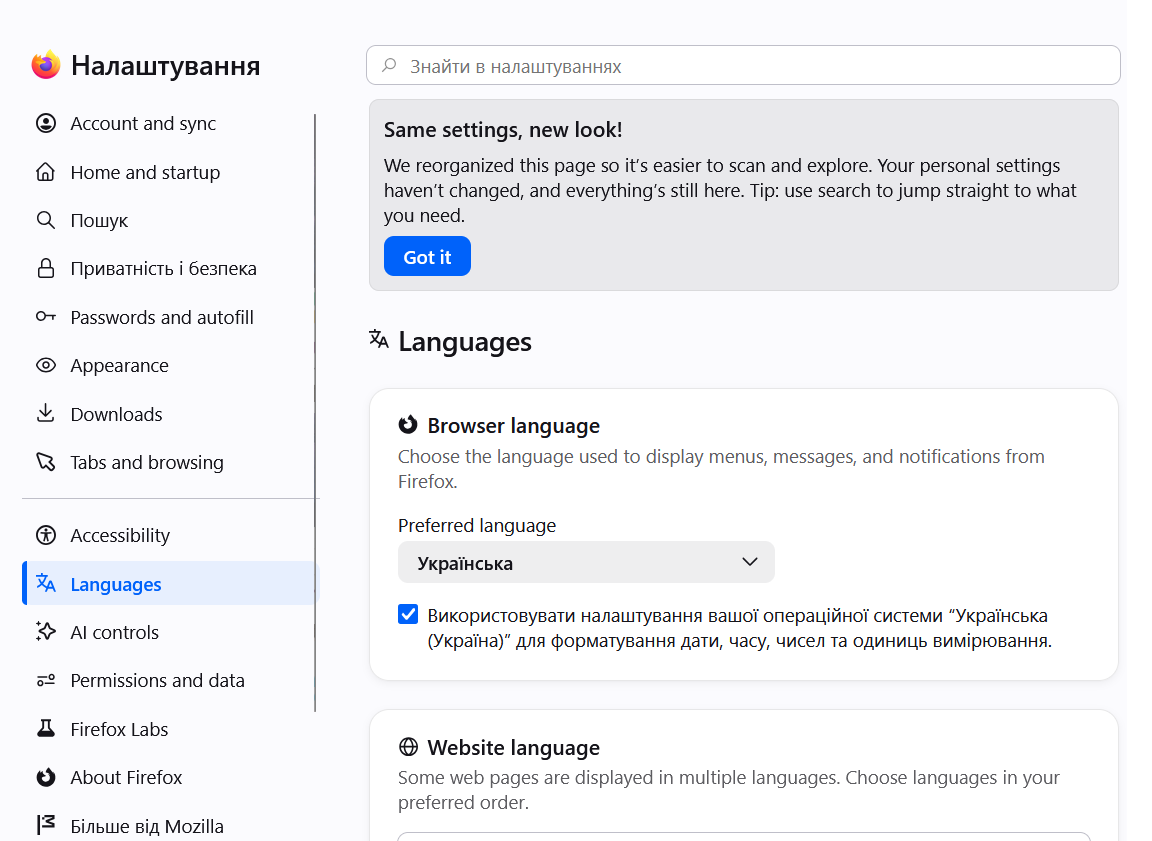
Hello. After another update, there was a problem with the translation of the settings window. After opening the window, despite the specified browser language (Ukrainian), most of the items are still displayed in English. Attempts to manually edit the settings, reinstalling the browser from a fresh installer on a new system did not help. How to fix it? Windows 11, Firefox 152.0.4
All Replies (1)
Chosen Solution
Yes, with v152 the new settings got rolled out, and it meant a lot of changes to the text content. These headings and descriptions showing in English are currently missing from the translation, as it is provided by volunteers from around the globe, and takes some time to fully catch up when something new as expansive as this ships.
I see some of the strings you've attached above are being translated for a while, coincidentally by volunteers you might see around here in support forums, but are yet to be approved by the national reviewers.
This is how it works: https://mozilla-l10n.github.io/introduction/