


problem with yahoo mail icons in firefox 24

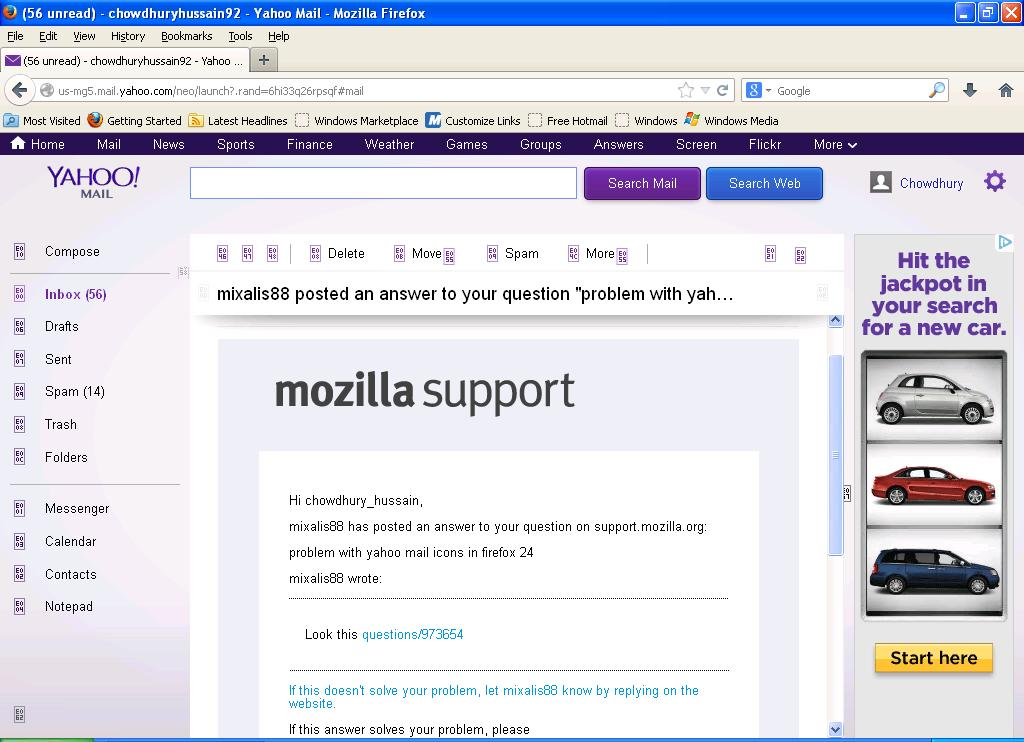
instead of the icons a small box with two rows of 2 digit number appear. Have tried clearing the cookies, installing recommended extensions but nothing works. pleas help
การตอบกลับทั้งหมด (10)
Look this questions/973654
Thank you mixalis88 I have already tried the steps on the link that you gave but it didn't work. i have also attached a screenshot with this reply, if that's any help.
Note that these icons are actually a custom font that is downloaded.
Make sure that you allow pages to choose their own fonts.
- Tools > Options > Content : Fonts & Colors > Advanced: [X] "Allow pages to choose their own fonts, instead of my selections above"
You can check the gfx.downloadable_fonts.enabled pref on the about:config page.
Reload web page(s) and bypass the cache to refresh possibly outdated or corrupted files.
- Hold down the Shift key and left-click the Reload button
- Press "Ctrl + F5" or press "Ctrl + Shift + R" (Windows,Linux)
- Press "Command + Shift + R" (Mac)
Start Firefox in Safe Mode to check if one of the extensions (Firefox/Firefox/Tools > Add-ons > Extensions) or if hardware acceleration is causing the problem (switch to the DEFAULT theme: Firefox/Firefox/Tools > Add-ons > Appearance).
- Do NOT click the Reset button on the Safe Mode start window.
เปลี่ยนแปลงโดย cor-el เมื่อ
cor-el, THANK YOU for this:
Note that these icons are actually a custom font that is downloaded.
Make sure that you allow pages to choose their own fonts.
Tools > Options > Content : Fonts & Colors > Advanced: [X] "Allow pages to choose their own fonts, instead of my selections above"
- that fixed the issue for me, all icons can be viewed in Yahoo mail now! However, I really DON'T prefer sites to use their own fonts, so I don't like having to change that setting, it slows down my ability to read pages.
You can use code in Stylish or userContent.css to override fonts used on web pages. You can do that for website that you visit frequently. There are also extensions that allow to toggle this setting to only use it when a website requires this like in this case with downloadable fonts.

I tried everything suggested here but I still have no mail option icons in yahoo mail http://prntscr.com/25wbca
You need to make sure that you allow pages you choose their fonts and that you have enabled downloadable fonts.
You can check the gfx.downloadable_fonts.enabled pref on the about:config page.
- Tools > Options > Content : Fonts & Colors > Advanced: [X] "Allow pages to choose their own fonts, instead of my selections above"
Thanks for the reply
Screenshots of my settings http://prntscr.com/26ay8s http://prntscr.com/26aynl Still no luck
เปลี่ยนแปลงโดย Johnice เมื่อ
Just as a PS...this problem started after one of the recent updates, which is the best version to use on XP 3?
It should work with those default settings.
Start Firefox in Safe Mode to check if one of the extensions (Firefox/Firefox/Tools > Add-ons > Extensions) or if hardware acceleration is causing the problem (switch to the DEFAULT theme: Firefox/Firefox/Tools > Add-ons > Appearance).
- Do NOT click the Reset button on the Safe Mode start window.