


Firefox opens a random url and an opening search box pops up

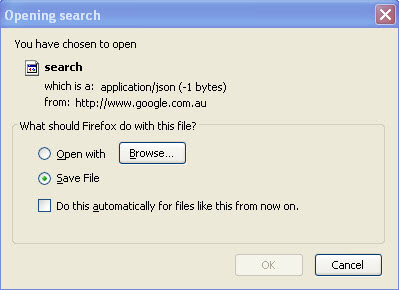
After a Google search, when I click on any URL Firefox opens a random url and an "opening search" box pops up with the following message
You have chosen to open
search
which is a: application/json(-1 bytes) from: http://www.google.co.in
What should Firefox do with this file ?
Open with
DownloadThemAll
Save File
What is causing this ? How do I restore normal behaviour ?
เปลี่ยนแปลงโดย olcal28 เมื่อ
การตอบกลับทั้งหมด (3)
This problem occurs most frequently for me when Google Instant trys to look ahead after I have typed a special character e.g. open italics.
Tried deleting/renaming search.json in my profile and it stopped the problem temporarily but now it is back.
เปลี่ยนแปลงโดย cpcp เมื่อ
.....
เปลี่ยนแปลงโดย kuritan เมื่อ
What profile are you referring to? How do I go about deleting/renaming search.json?