


Windows 10 reached EOS (end of support) on October 14, 2025. If you are on Windows 10, see this article.

ค้นหาฝ่ายสนับสนุน

Avoid support scams. We will never ask you to call or text a phone number or share personal information. Please report suspicious activity using the “Report Abuse” option.

เรียนรู้เพิ่มเติม
Open

How to search for an event in Calendar

joaquin.oakland

None of the options at: Which topic best describes your question fit my question at all. So, I selected the first one, Accessibility. (My only accessibility need is to wear reading glasses. I am. I picked that choice because it is first on the list. And because my problem is that I can't find out how to access Event search.)


I have search this site and also used Firefox to search widely. I find several answers to this question. However: None work in Thunderbird 153.8.0.

I don't see "Events and Tasks" anywhere. I don't see anything that looks like a menu bar. None of the suggested keyboard shortcuts work.

In my window I see:

 From the top:

TBird tab bar a bar for dates the calendar proper the window's thin bottom bar

 On the left:

a New Event button a month page

  On the right:

a header: Events with <, >, and x Dates and their events If I move the header to Events and Tasks, the only change is that there is a selection to at the bottom to add a new task (I don't use tasks; none are shown.) I see no menu there. All I see by way of a menu bar is at the top of the window:

 Synchronize(greyed)   Event   Task   Edit(greyed)    Delete(greyed)
 Clicking Event opens a New Event window (OK: "dialog")

I see no "hamburger" menu anywhere on the screen. Command-F does makes no change that I can see. On my keyboard, which combines F function keys with icons for system functions,

  I press Option or Option+F10 or Fn or Fn+F10
     No change that I can see.

Please, I do want to search for a particular event.

I've been using TBird for decades. This is the first time I have a very important need to find a past event, for which I do not recall the date.

And: Thanks.

None of the options at: Which topic best describes your question fit my question at all. So, I selected the first one, Accessibility. (My only accessibility need is to wear reading glasses. I am. I picked that choice because it is first on the list. And because my problem is that I can't find out how to access Event search.) I have search this site and also used Firefox to search widely. I find several answers to this question. However: None work in Thunderbird 153.8.0. I don't see "Events and Tasks" anywhere. I don't see anything that looks like a menu bar. None of the suggested keyboard shortcuts work. In my window I see: From the top: TBird tab bar a bar for dates the calendar proper the window's thin bottom bar On the left: a New Event button a month page On the right: a header: Events with <, >, and x Dates and their events If I move the header to Events and Tasks, the only change is that there is a selection to at the bottom to add a new task (I don't use tasks; none are shown.) I see no menu there. All I see by way of a menu bar is at the top of the window: Synchronize(greyed) Event Task Edit(greyed) Delete(greyed) Clicking Event opens a New Event window (OK: "dialog") I see no "hamburger" menu anywhere on the screen. Command-F does makes no change that I can see. On my keyboard, which combines F function keys with icons for system functions, I press Option or Option+F10 or Fn or Fn+F10 No change that I can see. Please, I do want to search for a particular event. I've been using TBird for decades. This is the first time I have a very important need to find a past event, for which I do not recall the date. And: Thanks.

การตอบกลับทั้งหมด (1)

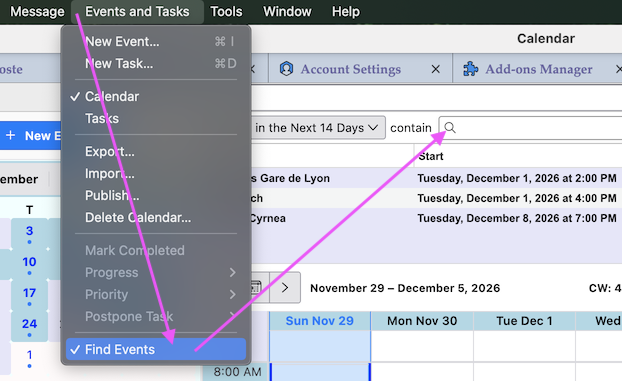
In the Thunderbird toolbar go to Events and Tasks > √ Find Events
ถามคำถาม

You must log in to your account to reply to posts. Please start a new question, if you do not have an account yet.