


How can I stop Mozilla from continually adding Firefox to my Win 11 start menu?

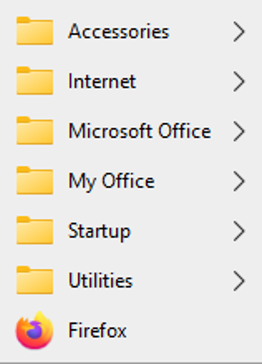
I have organized my Win 11 start menu into logical groupings to avoid a long irrational lists of programs requiring me to sort-through each time I want to open another app. I use Firefox frequently enough that it has a 'permanent' place on my taskbar so it is easy to open it and proceed expeditiously.
However, Mozilla has recently decided it will overrule my process by repeatedly adding 'Firefox' as another choice on my start menu -- I delete it each time, only to find they have added it again each time I reboot. I find this to be quite obnoxious and arrogant.
Perhaps I need to consider moving to another browser and uninstall Firefox once an for all....
การตอบกลับทั้งหมด (2)
Wondering about you Start menu, it looks like one from Win 10 mine is not like that at all, where do you find that ??
I find this to be quite obnoxious and arrogant.
First it def. doesn't happen to me, but then I don't have a menu like you, so waiting to see how you got that menu.
Secondly Firefox is an app and can't be arrogant, no-one actually interfered with your computer lol
Do wonder how this happened I have seen other users who have the same/similar, you may like to search and see how their queries evolved.
Will look for a link . . . . https://support.mozilla.org/en-US/questions/1600057 Ah! already referred to - next reply
เปลี่ยนแปลงโดย amoun เมื่อ