


Profile Manager

Been using Thunderbird for a number of years but recently the SSD on my laptop became corrupted and I had to buy a new one and install TB and restore my profiles from a backup.
I have two accounts and switch between them with Profile Manager.
The new laptop is an ASUS Vivobook with Win 11 Home and although TB runs ok the first time, if I close the current session and try to open the other account, nothing happens when I click on TB icon on the taskbar. IF I wait for around 5 minutes then it will run
Checked in Task Manager and cant see any instances of TB running, so any thoughts on what's wrong. Does not matter which order I open the accounts.
การตอบกลับทั้งหมด (5)
I have two accounts and switch between them with Profile Manager.
As its name indicates the Profile Manager serves to open different profiles if you have created more than one profile. A profile can contain several email accounts. So do you want to switch between email accounts or between profiles?
Yes, I know this, and each of my profiles has more than one account in them
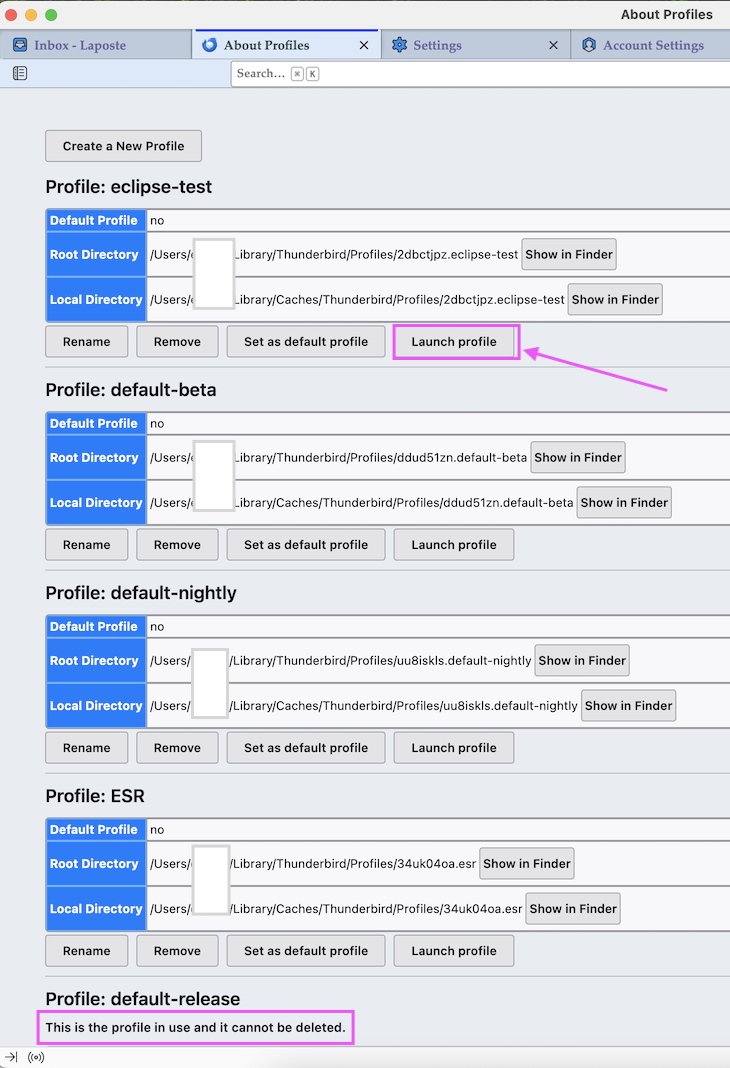
If you have created two profiles for the same Thunderbird version and you want to switch from one to the other profile the best way is to use the profile manager you can access via Help > Troubleshooting Information > Profiles > about:profiles.... which will open the tab "About Profiles" (image). You can keep this tab permanently in the tab bar, so you will be have a quick access to it when you want to switch to the other profile.
"About Profiles" is some sort of profile manager, and if you want to switch to your second profile just click on the button "Launch Profile". A second instance of Thunderbird will open the other profile in a new window in the background and you'll have to put it in the foreground by clicking on its icon in the task bar. You are not obliged to quit the first Thunderbird instance but can keep both instances (profiles) side by side. If you want to exit one instance you must put it in the foreground. The other instance will stay open.
Hi
This is fine as workaround, but it doesn't solve the underlying issue.
With one instance of TB running, which I then exit from, I can't reopen TB again for a couple of minutes. Clearly, something is going on deep in Windows preventing the execution of TB
Been looking further into this, unscientifically, and discovered that when closed, TB disappears from Task Manager instantly, but according to File and Folder Unlocker by DiamondCS, it remains running in the background for some time after. Guess "housekeeping" or tiding up