


Thunderbird Meadow email attachments problems

Recently updated to ESR Meadow.
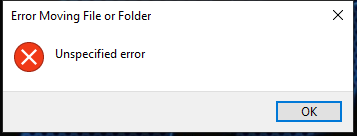
Now when I try to save attachment from an email by dragging and dropping to desktop, Windows pops up "Error Moving File or Folder - Unspecified error" and the operation fails.
And when I try to save attachment from an email by right click > open > Save dialog, the save filename is always "nsmail" but with the original file extension. E.g. a jpg attachment would come up as "nsmail.jpg", and a txt file attachment would come up as nsmail.txt. It does then save it, but why lose the filename?
It used to preserve the attachment filename, I'm sure! And drag and drop to desktop was such a convenient feature!
I have tried in Troubleshoot mode and behaviour is the same. I have tried in Windows Safe mode and behaviour for Save is the same; but drag and drop is completely disabled there (when I drag it, it shows a circle with line through icon).
Is it just me?
การตอบกลับทั้งหมด (4)
Ok will try that
Yes confirmed. I get "Unspecified error message"
Works by right clicking and saving to desktop :)
เปลี่ยนแปลงโดย amoun เมื่อ
D&D is broken in 153. It' might be a few weeks before it returns.
Reporter, do you find this is fixed in 153.0.3 ??
Yes, I can confirm the drag and drop issue is fixed for me now in 153.0.3esr (32-bit) Many thanks indeed! I appreciate all the great work from everyone at Mozilla :)
I do notice that it's still true that when I open an attachment from a mail in my Drafts folder, it opens with the name "nsmail" instead of the attachment filename (happens whether I open in an application, or go to the open>save option), but not so when I open from Inbox (in that case it retains the filename just fine). I do not know if this has always been the case or is new. It seems a bit strange that the right-click on attachment is different depending on Drafts folder vs other.
เปลี่ยนแปลงโดย Tiger Tiger เมื่อ