


Can't log into imap account that used to work no problem

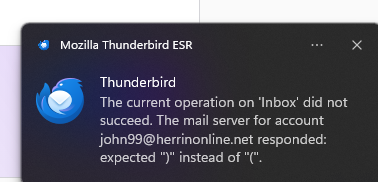
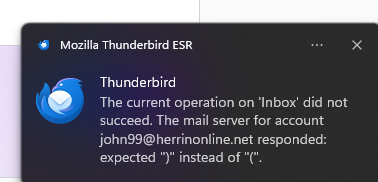
For the last two day when I start Thunderbird I get the message "The current operation on 'Inbox' did not succeed. The email server for account [edited]@herrinonline.net responded: expecting ")" instead of "(".
This is happening with all 4 email addresses I have. 3 on ionos and 1 on gmail.
I have checked all the settings for the Ionos webmail server and the Gmail server and they are correct. I have deleted of of the accounts and recreated it but still get the same message.
Attached is a capture of the actual error message. If I try to synch with any of the email addresses I get the same message for that email
Can you offer any help?
Thanks,
John
เปลี่ยนแปลงโดย john9910 เมื่อ
วิธีแก้ปัญหาที่เลือก
David,
FYI - I checked Thunderbird this morning and still had the same problem. I did, however, find the solution. I created a new profile and started Thunderbird without creating an email address. I then did a full import from the original profile. It appears that everything is working properly now. Thank you for your help.
John
อ่านคำตอบนี้ในบริบท 👍 0การตอบกลับทั้งหมด (7)
If this was working a few days ago, and if you have made no changes, I suggest you contact your email provider, as this appears an error message from the mail server.
Thank you David. I will contact Ionos, but I'm doubtful. I'm trying to move away from Microsoft Outlook, and like a lot of the Thunderbird features, but still have Outlook on my pc and it synched with no problems when I tried using it today.
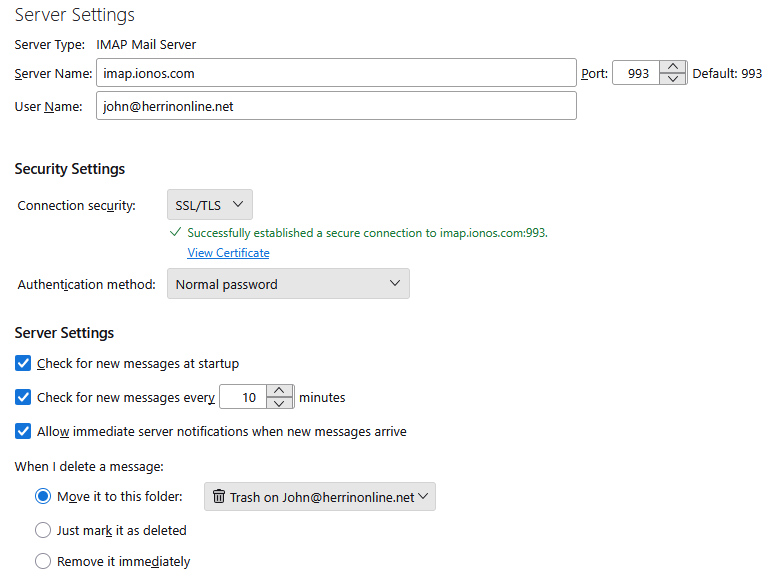
To get another set of eyes, I suggest posting screenshot of your incoming server settings pane.
Thanks David. I've attached a screen shot.
I've been working with Ionos and they have initiated a "Mailbox Repair Process". This would take a couple of hours. I'll check it tomorrow morning.
That sounds like a solution is coming. There is nothing you can do about that error message; that's why I'm assuming it is a flaw in a script being executed on the server. :) happy 2026!!!!
วิธีแก้ปัญหาที่เลือก
David,
FYI - I checked Thunderbird this morning and still had the same problem. I did, however, find the solution. I created a new profile and started Thunderbird without creating an email address. I then did a full import from the original profile. It appears that everything is working properly now. Thank you for your help.
John
Thanks for the feedback. I guess we'll never know whether the server repair or the reinstall was the solution. I have never seen that error, but I'm very pleased that you resolved it so easily. :)