หัวข้อนี้ถูกเก็บถาวรแล้ว
โปรดถามคำถามใหม่หากคุณต้องการความช่วยเหลือ

เก็บถาวรแล้ว
Confused about settings on different accounts

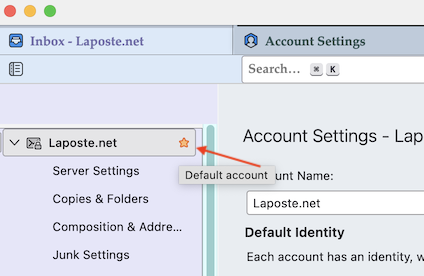
I have two email accts. In Account Settings, left pane, my 'business' acct shows first (alphabetical) and has a yellow star next to the name. My 'home' acct appears second and does not have a star. What does the star signify and if it influences any behavior, how would I change it to the other acct?
In the SMTP settings window, my 'home' acct appears first and is labeled as (default). How is this designation supposed to change any behavior, and how would I change it if I wanted to?
I have two email accts.
In Account Settings, left pane, my 'business' acct shows first (alphabetical) and has a yellow star next to the name. My 'home' acct appears second and does not have a star. What does the star signify and if it influences any behavior, how would I change it to the other acct?
In the SMTP settings window, my 'home' acct appears first and is labeled as (default). How is this designation supposed to change any behavior, and how would I change it if I wanted to?
การตอบกลับทั้งหมด (1)
The yellow star signifies that this account is the "Default" account. You can change the default account in "Account Actions"