Screen sharing for Glance Technologies (aka Perk Labs) is blocked by some Firefox Privacy settings?

My financial firm rep said they use Glance Technologies (aka Perk Labs) for screen sharing with their client devices. However, the screen sharing could not be made to work today with the rep on the phone, even though I unchecked the button in my Firefox Privacy settings for blocking popups. I am now wondering if some other Privacy settings in Firefox are known to create issues with Glance Technologies screen sharing. It would also be interesting to find out more generally about Firefox settings and screen sharing using other screen sharing technology firms.
วิธีแก้ปัญหาที่เลือก
hello Quenchoo,
follow the steps:
Enable the Screen Sharing Permission
- On windows, right click the webpage and select View Page Info.
- On a mac, hold the control key while clicking the webpage and select View Page Info.
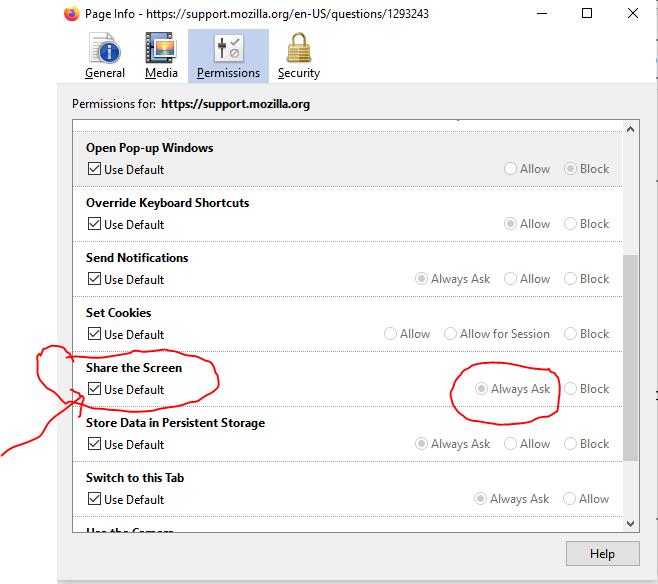
Go to the permissions tab where you will see a “Share the Screen” option.
Set that to “Use Default” instead of “Block”.
i have attached image for better understand .
tell me its help
Thank you and Regards,
Arman
อ่านคำตอบนี้ในบริบท 👍 1การตอบกลับทั้งหมด (1)
วิธีแก้ปัญหาที่เลือก
hello Quenchoo,
follow the steps:
Enable the Screen Sharing Permission
- On windows, right click the webpage and select View Page Info.
- On a mac, hold the control key while clicking the webpage and select View Page Info.
Go to the permissions tab where you will see a “Share the Screen” option.
Set that to “Use Default” instead of “Block”.
i have attached image for better understand .
tell me its help
Thank you and Regards,
Arman