


how can i find the profile a firefox window belongs to?

in one desktop i may have 7 .. 20 or more firefox windows, operating from 4, 5 or 7 profiles.
for any window, i want to know what profile it is running from. but firefox will not tell you that. the help button only tells what build of firefox you have. i can find nothing pertinent in about:config.
for any firefox window, how can i find the profile it belongs to?
การตอบกลับทั้งหมด (4)
It is only going through 1 Profile. It would be impossible to figure that one out. What is it that you are trying to do ? What is the end result ?
https://support.mozilla.org/en-US/kb/profiles-where-firefox-stores-user-data

วิธีแก้ปัญหาที่เลือก
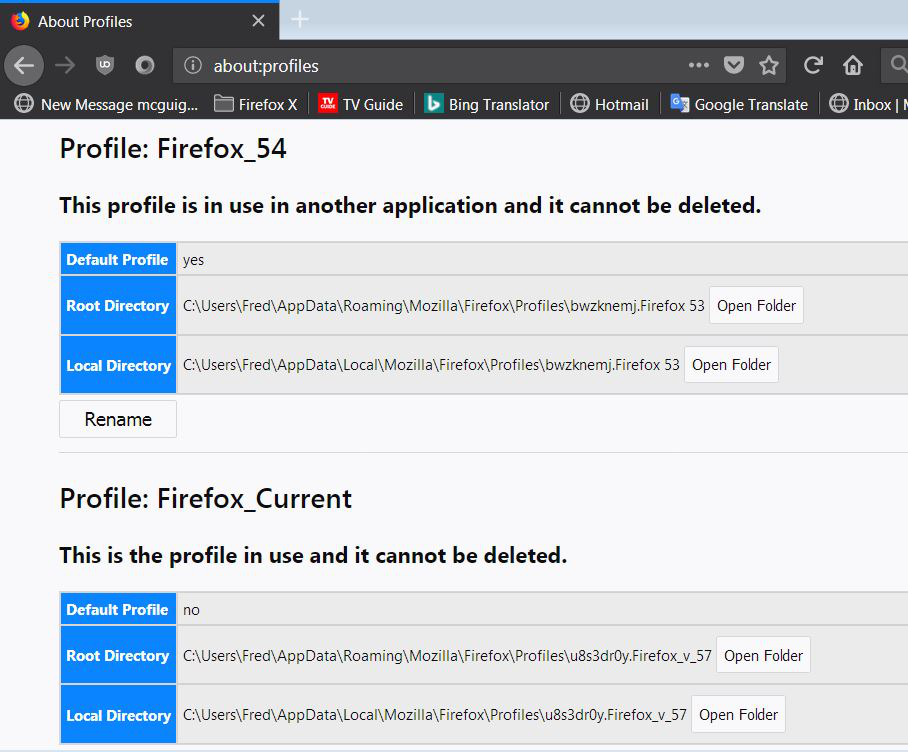
Type about:profiles<enter> in the address bar. Change nothing here.
There are two messages to look for;
This profile is in use in another application = another Firefox using this
This is the profile in use = this is the profile that Firefox is using.
i have a number of profiles, each of which i use for a different purpose. for example, some have proxies, some not. i usually am running numerous windows with different profiles, it is difficult not to get lost.
the 1st reply is incorrect.
for the 2nd reply, thank you very much. about:profiles i did not know about.
it were good if mozilla made the name of the current window's profile easier to get to, such as by putting that information in the help - over firefox menu item.
Glad to help. Safe Surfing.