


Gmail shows suspicious message

Hello,
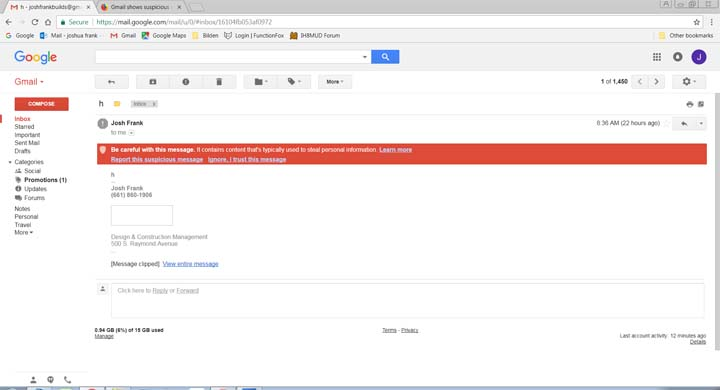
When I send an email from thunderbird to a gmail account the attached message pops up. Others in company send email from a differenct email platform do not have the same problem.
When I send an email without the html signature the message from gmail does not show up. So I am thinking it has to do with the signature.
Please help!. Thanks, Josh
วิธีแก้ปัญหาที่เลือก
How is the signature constructed? I see that gmail has apparently blocked the image, so I suspect it is hosted on a server and your sig connects to it via an URL. This is almost certainly what gmail is complaining about.
See if you can assemble your signature in Thunderbird with an embedded image rather than a linked image.
อ่านคำตอบนี้ในบริบท 👍 1การตอบกลับทั้งหมด (4)
attached?
ooops sorry here is the screen cap
วิธีแก้ปัญหาที่เลือก
How is the signature constructed? I see that gmail has apparently blocked the image, so I suspect it is hosted on a server and your sig connects to it via an URL. This is almost certainly what gmail is complaining about.
See if you can assemble your signature in Thunderbird with an embedded image rather than a linked image.
I dragged the image and seemed to embed. Problem solved. thanks, Josh