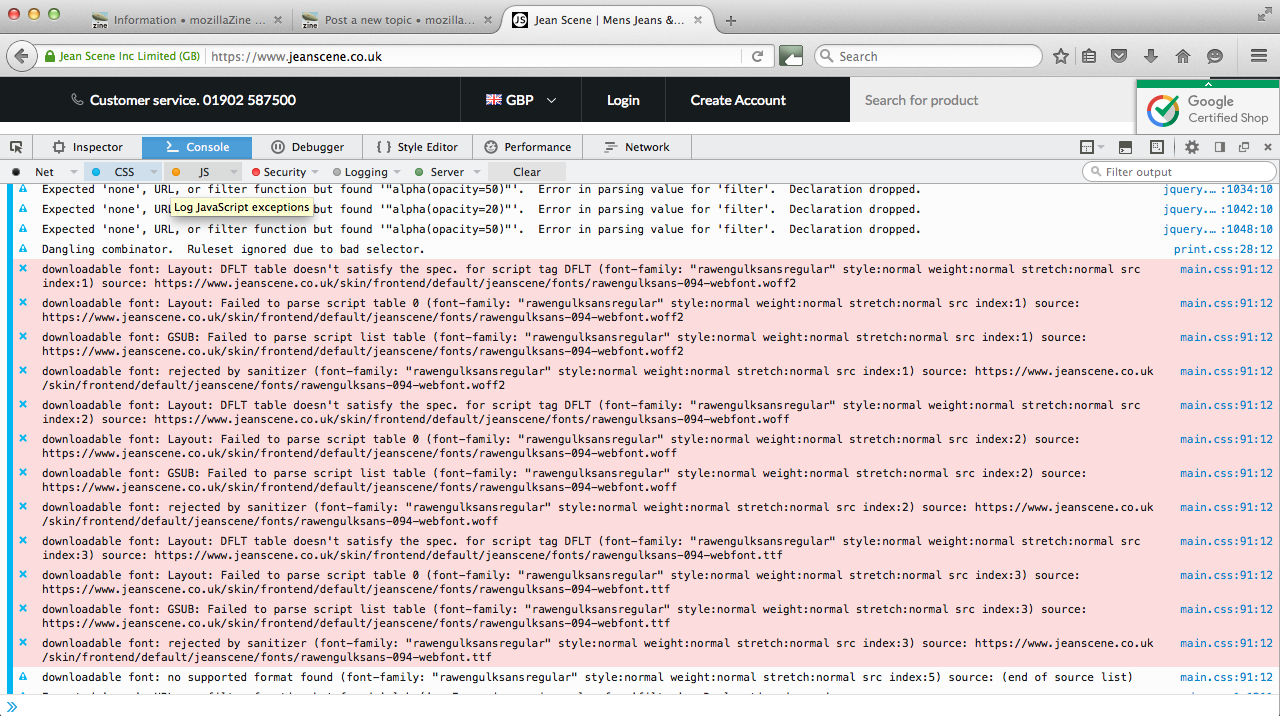
Updated to Firefox 44.0 now web font rawengulksans will not display

I have rawengulksans font installed as a font on my website, since the automatic update to 44.0 this font is no longer displayed. I have rolled back to a earlier verison of firefox and the font works fine. I have also tested the webpage on IE, Chrome & Safari these browzers also display the font with no issue.
@font-face {
   font-family: 'rawengulksansregular';
   src: url('../fonts/rawengulksans-094-webfont.eot');
   src: url('../fonts/rawengulksans-094-webfont.eot?#iefix') format('embedded-opentype'),
        url('../fonts/rawengulksans-094-webfont.woff2') format('woff2'),
        url('../fonts/rawengulksans-094-webfont.woff') format('woff'),
        url('../fonts/rawengulksans-094-webfont.ttf') format('truetype'),
        url('../fonts/rawengulksans-094-webfont.svg#rawengulksansregular') format('svg');
   font-weight: normal;
   font-style: normal;
}
I have rawengulksans font installed as a font on my website, since the automatic update to 44.0 this font is no longer displayed. I have rolled back to a earlier verison of firefox and the font works fine. I have also tested the webpage on IE, Chrome & Safari these browzers also display the font with no issue.
@font-face {
font-family: 'rawengulksansregular';
src: url('../fonts/rawengulksans-094-webfont.eot');
src: url('../fonts/rawengulksans-094-webfont.eot?#iefix') format('embedded-opentype'),
url('../fonts/rawengulksans-094-webfont.woff2') format('woff2'),
url('../fonts/rawengulksans-094-webfont.woff') format('woff'),
url('../fonts/rawengulksans-094-webfont.ttf') format('truetype'),
url('../fonts/rawengulksans-094-webfont.svg#rawengulksansregular') format('svg');
font-weight: normal;
font-style: normal;
}
การตอบกลับทั้งหมด (1)
Please see attached image.