how to get rid of the lines when numerous replies to an email

hello... we are going to use Thunderbird for our company emails as we have work load splits going on and need to know who is replying to which email that comes in..
As we have been practising and mucking around with it we notice that for every reply to a message that contacins the previous email lots of different colour lines appear at the sides almost like and indent section.. for us a company we find this incredibly un professional and wondered if you would be able to help us to remove these
การตอบกลับทั้งหมด (1)
Make Hidden files and folder visible:
In Thunderbird:
- Help > Troubleshooting Information
- click on 'show folder' button
- a new window opens showing your Profile folder.
- Close Thunderbird now - this is important.
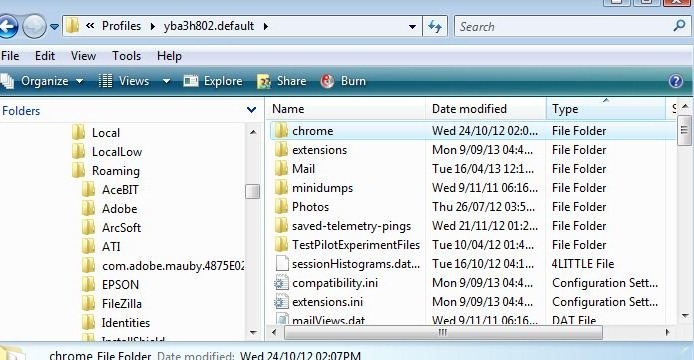
- Create new folder and call it chrome note the spelling - use a lower case 'c' It should be in the same place as the 'Mail' folder.
see image below showing location.
- open Notepad: usually located under All Programs > accessories > Notepad
- Copy everything between lines below and paste it into the Notepad document.
- Save the document as filename userContent.css in the chrome folder. Note the spelling all lower case except for the 'C'.
/* used to remove vertical lines seen when you 'Reply' */
blockquote[type=cite] {
   padding-bottom: 0 !important;
   padding-top: 0 !important;
   padding-left: 0 !important;
   border-left: none !important;
   border-right: none !important;
}
Start Thunderbird. Tools > Options > Advanced > General tab or Menu icon > Options > Options > Advanced > General tab
Click on 'Config Editor ' button - it will tell you to be careful :)
In top search type : quote look for this line : mail.quoteasblock; Value = false double click on line to toggle the 'false' to a 'true'
look for this line : mail.quoted_graphical; Value = false double click on line to toggle the 'false' to a 'true'
Close window - top right X click on OK to save and close Options.
Test. select email and click on 'Reply'.
If this works for you, please select this comment as a 'Chosen Solution'.