


Blinking vertical lines in tab bar?

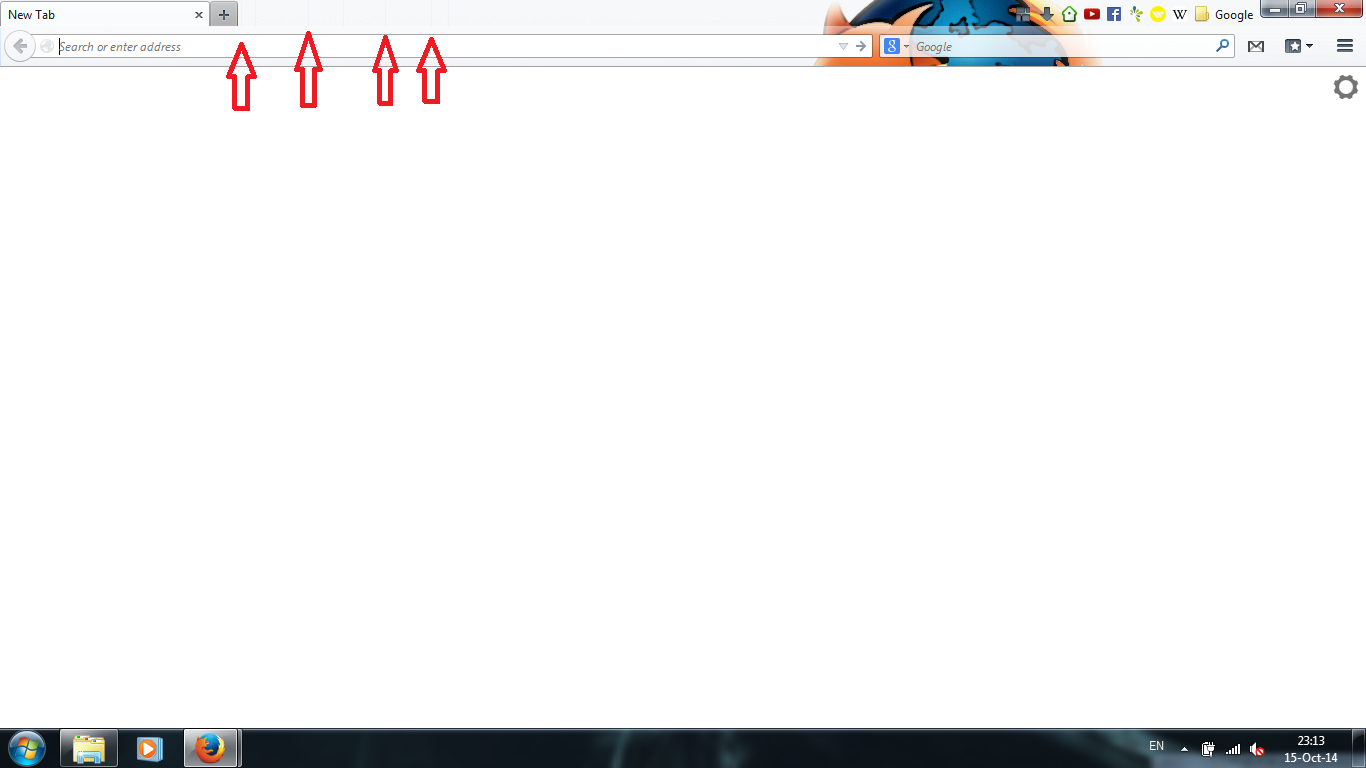
There are small vertical lines in the tab bar. They appear after closing tabs. They blink and change places when I hover the cursor over any Firefox buttons or bars. And sometimes they start to blink and mirror the text cursor in the address bar.
Disabling all add-ons and themes does not affect them.
I'll try to add a screenshot of the problem.
There are small vertical lines in the tab bar. They appear after closing tabs. They blink and change places when I hover the cursor over any Firefox buttons or bars. And sometimes they start to blink and mirror the text cursor in the address bar.
Disabling all add-ons and themes does not affect them.
I'll try to add a screenshot of the problem.
วิธีแก้ปัญหาที่เลือก
Start Firefox in Safe Mode to check if one of the extensions (Firefox/Tools > Add-ons > Extensions) or if hardware acceleration is causing the problem.
- Switch to the DEFAULT theme: Firefox/Tools > Add-ons > Appearance
- Do NOT click the Reset button on the Safe Mode start window
- https://support.mozilla.org/kb/Safe+Mode
- https://support.mozilla.org/kb/Troubleshooting+extensions+and+themes
การตอบกลับทั้งหมด (3)
Here is a screenshot
วิธีแก้ปัญหาที่เลือก
Start Firefox in Safe Mode to check if one of the extensions (Firefox/Tools > Add-ons > Extensions) or if hardware acceleration is causing the problem.
- Switch to the DEFAULT theme: Firefox/Tools > Add-ons > Appearance
- Do NOT click the Reset button on the Safe Mode start window
It was the hardware acceleration.
Thank you cor-el!