


Facebook working in Chrome not Firefox
i go to chrome have no problem getting and keeping Facebook i have closed and enable the extensions removed some and it either does not work or takes for ever in the version of Facebook. . I keep checking if Facebook is down there are limited problems but i do not see the problems in Chrome. if this keeps up i will be going to chrome which i really do not want to
ప్రత్యుత్తరాలన్నీ (12)
Hi Mary, have you tried starting your Firefox to troubleshoot mode and see if the problem remains?,
Firefox Troubleshoot Mode (previously known as Firefox Safe Mode) is a special diagnostic mode that temporarily turns off hardware acceleration, disables add-ons (extensions and themes) and resets some settings. See the Use Troubleshoot Mode in Firefox article for details.
If Firefox is open, you can restart in Firefox Troubleshoot Mode from the Help menu:
- Click the menu button
 , click Help, select Troubleshoot Mode and click Restart in the "Restart Firefox in Troubleshoot Mode?" dialog that opens.
If Firefox is not running, you can start Firefox in Troubleshoot Mode as follows:
- On Windows: Hold the Shift key when you open the Firefox desktop or Start menu shortcut.
- On Mac: Hold the option key while starting Firefox.
- On Linux: Quit Firefox, go to your Terminal and run firefox -safe-mode
(you may need to specify the Firefox installation path e.g. /usr/lib/firefox)
When the Firefox Troubleshoot Mode window appears, select "Open".
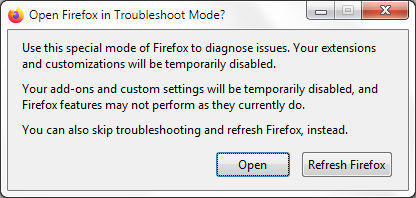
If the issue is not present in Firefox Troubleshoot Mode, your problem is probably caused by an extension, theme or hardware acceleration. Please follow the steps in the Troubleshoot extensions, themes and hardware acceleration issues to solve common Firefox problems article to find the cause.
To exit Firefox Troubleshoot Mode, just close Firefox and wait a few seconds before opening Firefox for normal use again. (If you can't exit Firefox Troubleshoot Mode, please see Firefox is stuck in Troubleshoot Mode).
When you figure out what's causing your issues, please let us know. It might help others with the same problem.
i have doe that but why should i do that everytime i try and go to faceboo and yes i tried that and th same thing happens wit all extentions turned off
Hey Mary, the issue might also be caused by a theme, extension or hardware acceleration. As I can't reproduce on my end, it might not be a webcompatability issue and caused by a specific setting on your Firefox. Nevertheless, I will file a webcompat issue, to see if others can replicate.

Hi Mary, I am part of the webcompat.com QA team. Can you please state what version of Firefox you are using and on what operating system? What I would do to test this kind of issue, is:
1. Type `about:profiles` in the url bar. 2. Choose `Create a new profile`. 3. Call it `deleteme` or anything you please. 4. Then start it. (this way you will be sure that nothing is interfering, no ghost caching etc.)- make sure account sync is not performed, as the extensions will be imported in the new profile. 5. Test.
Note: You can return to your old profile at any given time by accessing "about:profiles" in the address bar
149.0 windows 10 i do not want to make anew profile and lose everything i have as of now
Hey Mary, I understand the inconvenience of creating a new profile but you won't loose everything. The new profile is just for testing problems so we understand why facebook is not working for your Firefox and exclude the possibility of interference. Once it's confirmed, you can return to your old profile, where all your data are. Creating new profile doesn't mean you need to delete the old one.
thank you . I know this is not related but i am having Thunderbird trouble as well have sent all sorts of support to th Thunderbird help site
Sorry to hear that but unfortunately I don't have much knowledge on Thunderbird to be able to help.
No, we are not. There are of course community members that contribute to both forums, but for the most part we are not the same people.