


Windows 10 reached EOS (end of support) on October 14, 2025. For more information, see this article.

Search Support

Avoid support scams. We will never ask you to call or text a phone number or share personal information. Please report suspicious activity using the “Report Abuse” option.

ఇంకా తెలుసుకోండి

How do I get Firefox to open windows in the correct order?

  • 1 ప్రత్యుత్తరం
  • 0 ఈ సమస్యలు కలిగి ఉన్నాయి
  • చివరి సమాధానమిచ్చినది jonzn4SUSE

more options

When I start Firefox on Windows it does not open all the Windows it had last time even though that option is selected in settings. It seems random on which Windows open.

Then I start one Window at a time and restore my tabs from bookmarks. Once I have done that I have all the Windows in the order I want, with the tabs I want.

Then for no apparent reason some of the Windows disappear and/or the Windows change order. This is very frustrating.

How do I get Firefox to always open the Windows in the correct order and keep them displayed in that order?

When I start Firefox on Windows it does not open all the Windows it had last time even though that option is selected in settings. It seems random on which Windows open. Then I start one Window at a time and restore my tabs from bookmarks. Once I have done that I have all the Windows in the order I want, with the tabs I want. Then for no apparent reason some of the Windows disappear and/or the Windows change order. This is very frustrating. How do I get Firefox to always open the Windows in the correct order and keep them displayed in that order?

ప్రత్యుత్తరాలన్నీ (1)

more options

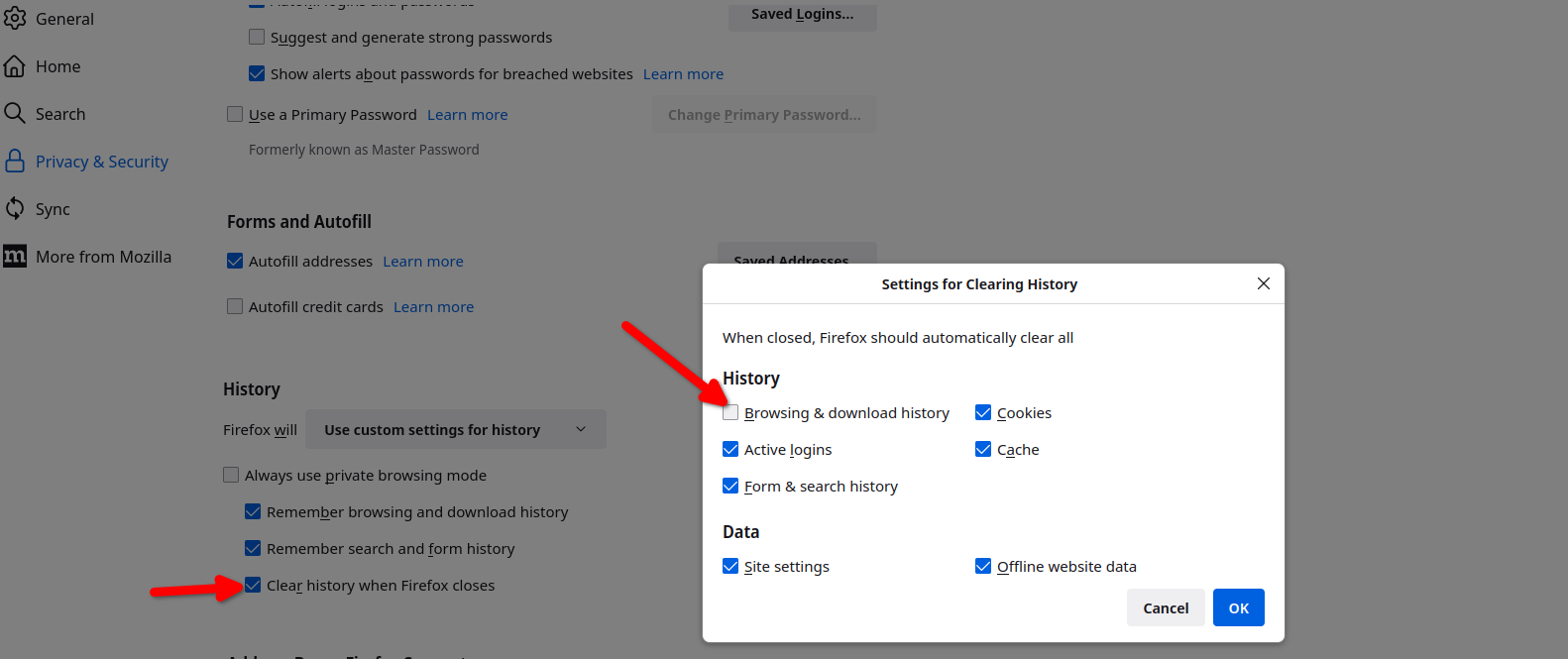
Here are my settings so that my previous windows open. see screenshots That one box is not checked, but Firefox does have a frequent habit of not restoring the sessions. See this link if that's the issue. https://support.mozilla.org/en-US/questions/1557927#answer-1790790

ఒక ప్రశ్న అడగండి

You must log in to your account to reply to posts. Please start a new question, if you do not have an account yet.