


Warning when login into Outlook live

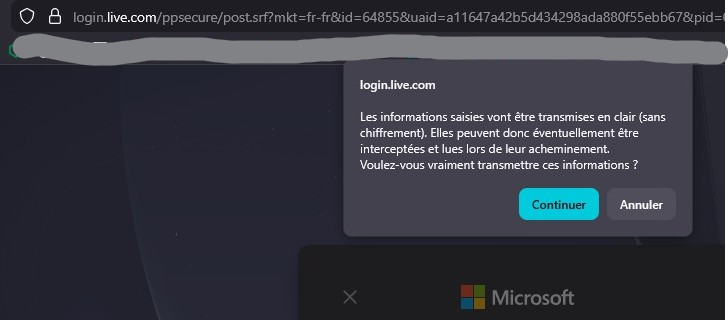
Hi, Since three or four months, whenever I log into Outlook live, either on Mac or Windows PC, I get a security warning saying that the information will not be secure (Please see attachment.) When I log into the same account, from Edge for example, I do not get the warning popup. I really enjoy using Firefox and would love to continue but this case is worrying me a bit. Any idea to help? Thank you very much, Mathieu B.
ప్రత్యుత్తరాలన్నీ (6)
I'm in it everyday and don't have that issue. When was the last time you changed your password?
Have you tried with Firefox in Troubleshoot Mode? https://support.mozilla.org/en-US/kb/diagnose-firefox-issues-using-troubleshoot-mode#w_how-to-start-firefox-in-4troubleshoot-modesf5safe-modesf
Are you running any security software besides MS Defender? Windows home or pro?
I have Bitdefender installed on my Windows PC (Pro). I do not think the issue comes from there since I've mentionned that the same issue occurs on my Mac (Catalina 10.15.7).
I'll try Firefox in troubleshoot mode... I'll also try changing my password. Thank you.
You can also boot windows to safe mode with networking to see if you still have the same issue. Running windows pro, you can also test in Windows Sandbox (VM) to see if you have the same issue. https://www.howtogeek.com/399290/how-to-use-windows-10s-new-sandbox-to-safely-test-apps/