why does paid VPN have no agent support?
why does paid VPN have no agent support?
Open


why does paid VPN have no agent support?
apps kaha se download kare kaise kare or is pc par sound kyu nahi ata hai
I recently did an update as I often see it's time for an update, but this time it made me enter my account and seems like now asking me to rejoin again. Did somehow my ac… (மேலும் படிக்க)
I recently did an update as I often see it's time for an update, but this time it made me enter my account and seems like now asking me to rejoin again. Did somehow my account get deleted as I don't want to rejoin again and keep paying. Not sure what happened as updates are usually easy and painless.
And, for some sites like some banks and some universities make me turn off VPN before I can login to their sites - what's the issue hear?
A pop up occurs daily after I start the PC asking if I want Java update. How to tell if I even have Java? Thank you
i uninstalled firefox and i notice that some mozilla folders are in appdata roaming or local folder and i can not delete them myself. can you fix the issue with uninstall… (மேலும் படிக்க)
i uninstalled firefox and i notice that some mozilla folders are in appdata roaming or local folder and i can not delete them myself. can you fix the issue with uninstaller ? or can i delete them myself somehow ?
I'm running mac os Tahoe 26.6.2 on Macbook air. Message from Apple "Intel Based apps not supported update to silicone version". Followed steps on Firefox help page to do… (மேலும் படிக்க)
I'm running mac os Tahoe 26.6.2 on Macbook air. Message from Apple "Intel Based apps not supported update to silicone version". Followed steps on Firefox help page to download Mozilla VPN version but VPN version won't open. When I click Mozilla VPN in the application folder, I am directed to the Mozilla VPN page with the download on it. Then it's hanging up on a pop up (see attachment) saying Waiting for Subscription Verification.
Hello Folks I bought a new laptop. How do I get Mozilla on my new laptop? Staples would only offer me MacAfee product Frank [redacted email from community support forum] … (மேலும் படிக்க)
Hello Folks
I bought a new laptop. How do I get Mozilla on my new laptop? Staples would only offer me MacAfee product
Frank
[redacted email from community support forum]
i want to uninstall the 160.0b2 version
tell me if I have more than one version open
I'd like to use my Mozilla VPN on a new GL.iNet Slate 7 travel router, which has OpenWrt + OpenVPN firmware. (https://www.amazon.com/dp/B0F2MR53D6) Their instructions sa… (மேலும் படிக்க)
I'd like to use my Mozilla VPN on a new GL.iNet Slate 7 travel router, which has OpenWrt + OpenVPN firmware. (https://www.amazon.com/dp/B0F2MR53D6) Their instructions say if I want to use any VPN other than Nord, I need to get an OpenVPN config file from my VPN provider and upload it to the router.
I payed for Mozilla VPN. I downloaded and installed MozillaVPN.msi It does not work. The icon is on the right tool bar but I get a drop down that indicates that i need an… (மேலும் படிக்க)
I payed for Mozilla VPN. I downloaded and installed MozillaVPN.msi It does not work. The icon is on the right tool bar but I get a drop down that indicates that i need an app I thought I downloaded the app. Here is the message: "Open Mozilla VPN
To use the Mozilla VPN Firefox extension, please open the Mozilla VPN app first. Open Mozilla VPN Get help The is no Mozilla VPN in my program files(?) Please help. Is there two programs that I must install? [redacted email]
The VPN installation does NOT work. I get the drop down with the icon and "To use the Mozilla VPN Firefox extension, please open the Mozilla VPN app first." There is NO … (மேலும் படிக்க)
The VPN installation does NOT work. I get the drop down with the icon and "To use the Mozilla VPN Firefox extension, please open the Mozilla VPN app first." There is NO Mozilla VPN app on my computer. It is not on desktop, menu, or app list (?).
Thank you in advance for your support. Dale Warnke [redacted email]
iphone: [redacted phone#]
Working on passkey, back and forth, meanwhile, retyping the above several times. I decided to copy it and save it so I won't have to type it again. we are going aroung in circles too many passwords, passcodes; I have 4 windows open and fell I am not getting anywhere(?)
All I want to know is how to get VPN that I paid for finally installed? There is too much confusion on getting this answered. All I want to do is to download(paid for) VPN and install it on FireFox and make
Have I been hacked, or something else?
Thank you in advance for your support. Dale Warnke [redacted email]
iphone: [redacted phone#]
Have I been hacked?
Hi! I´m using Jdownloader2. After an update of Firefox the captcha-extension of JDownloader didn´t work anymore. I reinstalled Firefox, but adding the extension is still … (மேலும் படிக்க)
Hi! I´m using Jdownloader2. After an update of Firefox the captcha-extension of JDownloader didn´t work anymore. I reinstalled Firefox, but adding the extension is still prevented. Following quote appears: "Firefox hat die Website daran gehindert, Sie zu fragen, ob Software installiert werden soll" It should be in yellow (but it isn´t), like following site describes: https://support.mozilla.org/de/kb/Add-ons-koennen-nicht-installiert-werden#w_firefox-hat-die-website-daran-gehindert-sie-zu-fragen-ob-software-installiert-werden-soll Furthermore there should be a button to authorize the installation. Instead there is only the button "OK". I followed the help-site mentioned above to the letter, to no avail. By the way, I´m using Nightly now, but JDownloader2 automatically wants access to Firefox. Would you please tell me, how to add the mentioned extension. Without it I couldn´t download most files! Please answer to following email: [redacted email from community support forum]
Best regards, Stefan P. aka perechon
CAN YOU ADVISE ME ON THE MATTER
Hello Community and/or Support, After installing the latest "Mozilla VPN Release 2.40.0" upon Windows 11 Version 26H2 OS Build 26300.9711, I received the follow error mes… (மேலும் படிக்க)
Hello Community and/or Support,
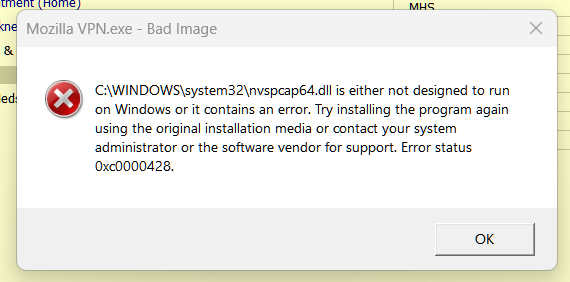
After installing the latest "Mozilla VPN Release 2.40.0" upon Windows 11 Version 26H2 OS Build 26300.9711, I received the follow error message 3 to 4 times in a row. after acknowledging the error (pressed "OK").
(See attached image) Mozilla VPN.exe - Bad Image is either not designed to run on Windows or It contains an error. Try installing the program again using the original installation media or contact your system administrator or the software vendor for support. Error status OxcOOON28.
Prior to installation, I just booted my computer and observed that my VPN App needed to be updated. I did not open any other app or perform any other work.
The VPN update informed me that it needed to close my current VPN connection to continue with the installation Update, which I allowed the update to manage.
In my troubleshooting efforts, reviewing other forums, and ask Google Gemini, I have performed the following. 1). Rebooted the computer after install. (Same Error Message) 2). Uninstall and reinstall Mozilla VPN. (Same Error Message) 3). Updated my NVIDIA GeForce GTX 1660 Ti driver to the latest release. (Same Error Message) 4). Ran "sfc /scannow" as administrator within the Command Prompt (Same Error Message). 5). Ran "dissm /online /cleanup-image /restorehealth" (Same Error Message).
Is there a method to correct the "Bad Image" error from popping up after restarting my computer? Also, would someone be so kind to inform the Mozilla VPN software team of this error?
Thank you all for your time!
I just updated my Mozilla VPN to version 2.40. Now, whenever the vpn is started, Windows reports that nvspcap64.dll is not designed to run on Windows or it contains an er… (மேலும் படிக்க)
I just updated my Mozilla VPN to version 2.40. Now, whenever the vpn is started, Windows reports that nvspcap64.dll is not designed to run on Windows or it contains an error. Error status 0xc0000428. I have tried uninstalling and reinstalling to no avail. I restored the nvspcap64.dll from a backup which didn't work either. I have attached a screenshot of the message.
Repeated clicking of the "OK" button on the message will eventually allow the vpn to open, but I'm not sure if it is working correctly.
Can this be fixed?
I would like to enable automatic updates for Firefox, but have not been able to do so. Please advise.
How can I prevent other sources from bypassing my Firefox/Mozilla downloads and installations? I once had a secure Firefox account. Now every time I update or reinstate… (மேலும் படிக்க)
How can I prevent other sources from bypassing my Firefox/Mozilla downloads and installations? I once had a secure Firefox account. Now every time I update or reinstate there is a possibility that it will be violated in the future without my direction or approval? HELP
still have a old version of Firefox on my desktop Tried to uninstall but got message: can't because helper.exe is not in appdata/local/uninstall found a helper.exe and un… (மேலும் படிக்க)
still have a old version of Firefox on my desktop
Tried to uninstall but got message: can't because helper.exe is not in appdata/local/uninstall
found a helper.exe and uninstall map, put it in Mozilla Firefox in local. Now I don't get the message that it can't be found but app is still not uninstalled from programm files.
If I tried to apply hlper.exe by hand, it doen not work.
How do I get rid of this version 135
Why after updating to 158.0 my taskbar no longer appears even after turning on, off, and on that feature in taskbar settings