


How to stop Firefox granting automatic cross-site cookie permissions?

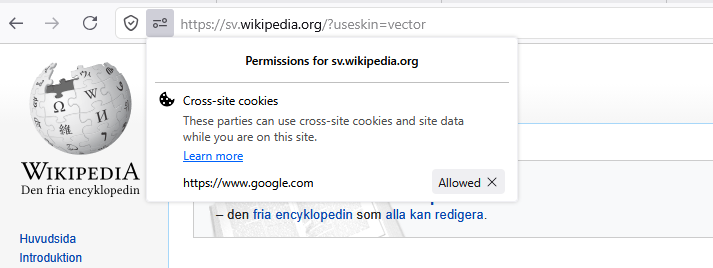
How can I stop Firefox from automatic granting sites cross-site cookie permissions (see screenshot)? The problem is that the cross-site cookie(s) granted for a site more often than not is completely unrelated to that site. This problem is very frustrating.
I have tried changing several settings in Tracking Protection but nothing has stopped Firefox from auto-granting these permissions. I have for example turned off "Fix major site issues (recommended)" but it has not changed this behavior.
Thankful for any help.
All Replies (7)
Settings > Privacy and security > Browsing data > Manage exceptions
amoun said
Settings > Privacy and security > Browsing data > Manage exceptions
How do you mean? If I add a site to that list cookies on that site will either be totally blocked or allowed. Has it any to do with cross-site cookies?
This is the "Automatic access" support.mozilla.org/en-US/kb/third-party-trackers#w_automatic-access right? I think that's the "custom" setting described in Third-party cookies and Firefox tracking protection — there's both the "Disable third-party cookies" section, as well as Total Cookie Protection jars and exceptions described if you want to look more into the background how these work/isolate.
jbr said
This is the "Automatic access" support.mozilla.org/en-US/kb/third-party-trackers#w_automatic-access right? I think that's the "custom" setting described in Third-party cookies and Firefox tracking protection — there's both the "Disable third-party cookies" section, as well as Total Cookie Protection jars and exceptions described if you want to look more into the background how these work/isolate.
Okay, thanks for reply. I will see if changing some settings here will do anything about it.
I found the setting at last. In about:config search for "auto_grants". Setting dom.storage_access.auto_grants to false seems to fix it.
EDIT: Have tested this setting a couple of days now and unfortunately Firefox still auto grants cookies.
loxia_01 மூலமாக திருத்தப்பட்டது
Disabling third-party cookies in ETP custom settings seem to work
Denys மூலமாக திருத்தப்பட்டது
Denys said
Disabling third-party cookies in ETP custom settings seem to work
Do you mean "Block all cross-site cookies" in custom ETP settings? I believe I have tested that.
Will continue testing by flipping the master setting dom.storage_access.enabled to false.
EDIT: Yes, "Block all cross-site cookies" in custom ETP settings seems to stop most of the automatic cross-site cookie permissions. Perhaps together with the above config setting.
loxia_01 மூலமாக திருத்தப்பட்டது