Folder Pane only opens/closes using the menu and cannot be "sized"
Until recently the folder pane could be sized or hidden via the double-headed arrowed cursor. Shortly after the 151.0.1 update this stopped working. All suggested solutions have not worked. A full uninstall (Revo Uninstall) and completely new profile has not fixed the problem. Folder pane only responds to the menu setting and is only Open/close but no sizing.
All Replies (4)

You don't mention what those "suggested solutions" were, so all I can suggest is that you restart in Troubleshooting Mode (see Help | Troubleshooting Mode) which will temporarily disable all add-ons and interface hacks (userChrome.css) to see if they are misbehaving. Does that change things?
That pane is fully resizable for me on several computers using that version of Thunderbird on various versions of Windows and Linux.
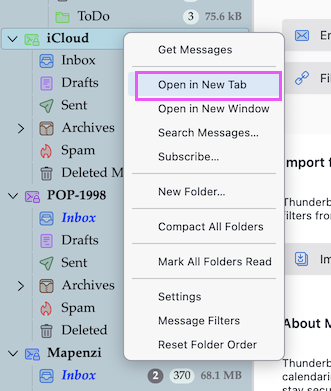
Thanks for replying. Seriously, I have spent hours researching this problem. My setup is a bit complicated as I have relocated the profile to another drive and of course changed the files that point to the profile location. I usually have 3 or 4 or more email accounts open each to their own tab. I've used this setup for a few years and have never encountered this problem of being unable to "grab" the folder pane margins to resize the width. I restored a Macrium Reflect file/folder backup that was from several days before the problem was noticed. I have tried the obvious things like clicking menu\view\layout\folder pane and toggling it back and forth. I have done the same with the hamburger menu. I updated to 152.0. I have deleted xulstore.json and session.json. Endless starting, closing and restarting Thunderbird. I have made the app window maximized, full-sized, almost full-sized and experimented with trying to grab the left margin (which used to turn blue and allow me to open folder pane with the mouse), and with the margin between the folder pane vertical scroll bar and the messages pane. I have tried various combinations of density, folder pane headers, views, unified folders (or not).
As mentioned, I have completely uninstalled Thunderbird and removed everything from appdata and local folders and the registry. An install of 152.0 was done using all default settings and locations. I have no extensions or themes or add-ons.
I repeated some of the previous steps. The folder pane now behaves as I want it to only for the first email account tab which perhaps not coincidentally was the first account created upon installation. Previously (for years) each tab could be sized or closed/opened independently of all others. I think the fix for the first account was made when I deleted xulstore.json and restarted Thunderbird twice. At any rate that tab works as desired.
I started Thunderbird in troubleshooting mode and disabled everthing it offered. The first account tab no longer behaved as before, i.e. The folder pane was not sizeable. The other accounts folder pane did not size either.
Taking a cue from your remark about userChrome.css (which did not previously exist) I created it and tried various CSS customizations. I'm not experienced in CSS so there was a lengthy conversation with Google AI which is pasted below inelegantly. But the TLDR is that none of the below worked.
/* Add horizontal spacing to the entire folder container across all accounts */
- folderTree li > .container {
 padding-left: 15px !important;  /* Space on the left side of the folder text/icon */
 padding-right: 15px !important; /* Space on the right side */
}
3. Adjust the Width of the Entire Folder PaneIf the pane itself feels locked or you want to permanently force a specific width regardless of window adjustments, use this variable:/* Force the folder sidebar pane to a specific width layout */
- paneLayout {
--folderPaneSplitter-width: 250px !important; /* Change to your preferred width pixel size */
} Again, this did not affect the folder pane adjustability for the 2nd and 3rd accounts. The first account works fine. What needs to be changed to allow the folder pane to be sized in width using the mouse. If you are using modern versions of Thunderbird (versions 115 through 128+), you are running into a layout quirk where the structural bounding boxes for your 2nd and 3rd accounts are literally "clipping" out of the visible pane boundary. This causes the mouse cursor to miss the hidden layout engine splitter entirely when hovering lower down on the screen To restore your ability to resize the pane with your mouse across all email accounts, you must explicitly force the structural overflow properties to stay synchronised. The CSS Fix to Restore Mouse-DraggingAdd this specific code to your userChrome.css file. It overrides the hidden block dimensions so that the window splitter responds to your mouse anywhere along the vertical border: /* Ensure the layout block allows resizing across all accounts */
- paneLayout,
- folderTree,
- folderPane {
 min-width: 100px !important;  /* Stops the structural layout from locking up */
 max-width: 800px !important;  /* Allows the mouse boundary to expand */
 overflow: visible !important; /* Prevents 2nd/3rd accounts from blocking the splitter */
}
/* Forces the modern drag-splitter to overlay perfectly on the border */
- folderPaneSplitter {
 width: 6px !important;        /* Makes the invisible mouse target area slightly wider */
 cursor: col-resize !important; /* Guarantees the double-headed arrow shows up */
 z-index: 100 !important;      /* Forces the dragging bar to sit on top of all accounts */
} What to do if the mouse still won't grab it:If the interface is severely glitched, your local interface layout file may be corrupted, locking the sidebar layout permanently for multi-account views. You can safely clear this layout cache:Go to Menu (≡) > Help > Troubleshooting Information.Click Open Folder next to your Profile Folder.Close Thunderbird completely while keeping that folder window open.Locate the file named xulstore.json and delete it (or rename it to xulstore.json.bak to be safe).Relaunch Thunderbird. It will reset the window layouts to the factory default, forcing the mouse divider to work correctly across the entire height of the screen.If the splitter works but the folder names inside look cut off or squeezed, let me know if they need a text alignment tweak!
These "suggestions" gave very poor results. scroll bars disappeared, the extreme left wall of the window indented, toggles wouldn't work. I'm out of ideas and hope you or others may have some ideas.
The userchrome thing is not intended to fix thing and is not guaranteed to work. If you don't know what you're doing, it is not recommended.
You mention that you have multiple accounts open each in a separate tab. This is a very unusual setup configuration, and I don't find any option to enable it, and I don't believe it's officially supported. I've been using Thunderbird for decades and I didn't even know that you could do that. I suspect that's the source of your problem. I don't know how to fix it. Sorry.
My only suggestion is to turn off that multiple accounts thing and go back to using the interface the way it was intended.
Lin said
You mention that you have multiple accounts open each in a separate tab. This is a very unusual setup configuration, and I don't find any option to enable it, and I don't believe it's officially supported. I
Hi Lin, it IS officially supported and you can do it via the R-click menu > "Open in New Tab" or also "Open in New Window" (see picture) But I wouldn't see any advantage in doing this. The accounts opened in new tabs are still present in the folder pane.