


No Message found - for inbox with 220460 unread messages

I am running Thunderbird 140.11.1esr on Windows 11. I have many email accounts mainly with btinternet which I access with Thunderbird. Most of them work fine but when I tried add another email account with a very large inbox all of the folders download fine but the inbox itself doesn't show any messages but the number alongside the folder says 220479 (which I think is unread messages). I have tried this on 2 different laptops with the same result. I have tried to Repair the folder. The folder is selected for offline use and I have tried to press the Download now button.
Any ideas?
Thank you
Paul
All Replies (27)

that is helpful article..
Hi Paul, verify your IMAP server settings in Account settings. If you use another antivirus software than Windows Defender uninstall it completely temporarily. As I said before verify that the global search is disabled.
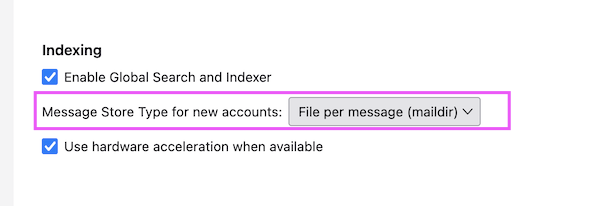
Maybe the mbox file format cannot handle the enormous quantity of messages in your Inbox. That's why I propose to switch to the "File per message" (maildir) Store Type. With the maildir format each message will be stored in the Thunderbird profile folder as a single *.eml file. Thus Thunderbird no langer has to handle one very big mbox file but many .eml files To change the message store type for new account to maildir go to Settings > General > Network & DiskSpace > Indexing > "Message Store Type for new accounts" > select "File per message" in the little menu. After that go to Account Settings and delete your problematic IMAP account. Thereafter, still in Account Settings click on New Account and set up the same account again with the IMAP protocol. This time Thunderbird will no longer create mailbox files for each folder, but .eml file for each message.
I cannot suggest another email client since I've always been a Mac user, and before Thunderbird I used Netscape and Mozilla Suite. I'm familiar with Apple "Mail" but the latter doesn't exist for Windows.
Mapenzi மூலமாக திருத்தப்பட்டது

maildir (eml) still has bugs, one of which may have caused me a temporary loss of data recently, so I have returned to using mbox.
My own approach in this situation—I am not saying that it is the best or only approach—would be:
If the theory is that the inbox holds too many messages, resolve that problem by deleting and moving messages. Spread those messages over several mailboxes on the server. Delete the Thunderbird account, set it up again, and see which mailboxes fetch messages successfully.
Investigate why UID fetch fails. AI, which we should not trust, indicates several possible causes. Each one suggests a different trouble-shooting approach.
To see if Thunderbird is the cause, try another client. I do not know many Windows e-mail clients or which are free or have free trial periods. Outlook? eM Client?
Hope that someone on the forum can explain why Thunderbird reports many messages in the inbox but shows none. Does it download all headers before any bodies? I have forgotten. Could the downloading of headers have been aborted because of a UID fetch failure on one message?
Could Spark have caused such a problem? I doubt it, but I wonder.
I might also see if the e-mail service provider has an export function. If it does, export and download all the messages in the inbox. Import them into a local folder. Make a back-up copy. Empty the inbox at the server. Delete and re-create the account.
Still thinking.
I'm leaving this discussion after saying what I had to say. Otherwise it will be become too complicated for Paul to follow more and more diverging instructions. Still I'm wondering why users want to handle email folders containing hundreds of thousands messages. The max I retrieved some years ago for a user in the French Thunderbird forum was 100.000 messages, and the re-building of the new GLODA file took nearly one night....
Mapenzi said
I'm leaving this discussion after saying what I had to say. Otherwise it will be become too complicated for Paul to follow more and more diverging instructions. Still I'm wondering why users want to handle email folders containing hundreds of thousands messages. The max I retrieved some years ago for a user in the French Thunderbird forum was 100.000 messages, and the re-building of the new GLODA file took nearly one night....
Please don't go. And if you believe that your ideas are best, I would like you to say so.
I share your reaction to very large folders. I have never had more than 13,000 messages in a folder. My inbox has eleven messages in it now.
I have a deadline to file my tax return, too ....
Mapenzi மூலமாக திருத்தப்பட்டது