


All Replies (7)
Hello,
Firefox automatically creates backups of your bookmarks, which can be helpful if your bookmarks are lost or missing. To recover them, follow the instructions below.
- Click the menu button
 , then click Bookmarks.
- Scroll to the bottom and click Manage Bookmarks.
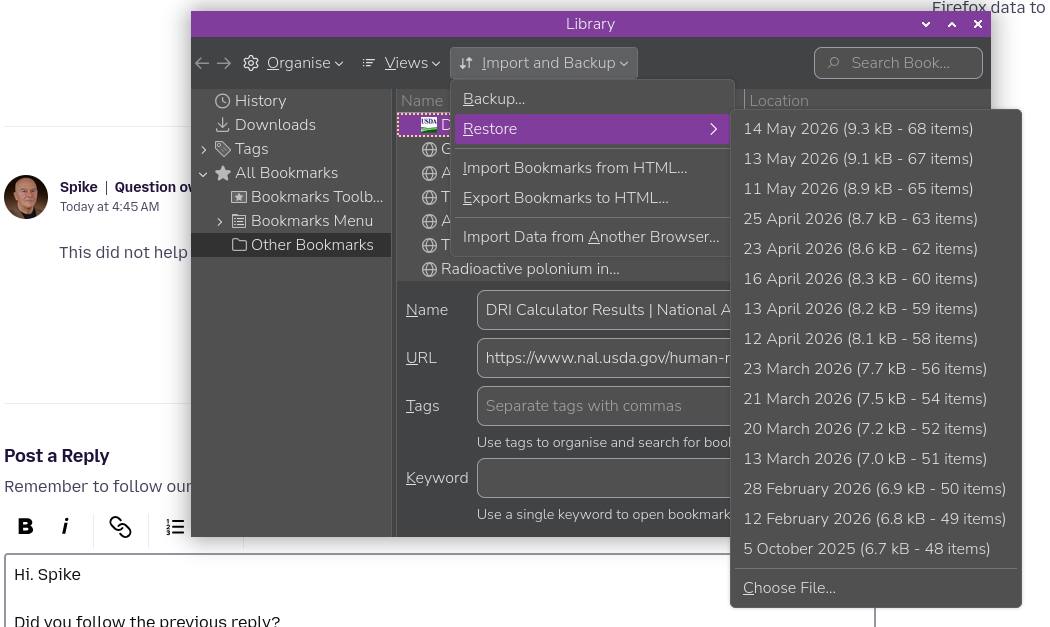
- At the top of the Library window, click on Import and Backup and select Restore.
- Click the date of the bookmark backup you want to recover.
- In the new window that appears, click OK.
Your bookmarks from the selected date should now be restored.
For more information, see the Restore bookmarks from backup or move them to another computer article. For other solutions, see the Recover lost or missing Bookmarks article.
Did this fix your problems? Please report back to us!
Thank you.
Hi. Spike
Did you follow the previous reply?
So what happened? Did you get something like this and yet it did not work?
See image
When I left-clicked on restore, nothing happened. What I saw did not look like the image you just attached.
Spike said
When I left-clicked on restore, nothing happened. What I saw did not look like the image you just attached.
OK. What Device and OS are you using and can you post a screen shot of what you see ?
I am currently using a Raspberry Pi, with Fx 150.0.2-1, That was the screenshot source.
Nothing like that on my Android device :( but presumably, the left click means you are on a computer . . .
amoun மூலமாக திருத்தப்பட்டது
I had to contact Norton Support to fix my problem. Norton took control on my desktop and had to go into a folder on my desktop labelled Old Firefox Data. Norton uninstalled Firefox and reinstalled it using the saved bookmarks in the Old Firefox Data folder. The problem was caused by a glitch from a recent automatically installed Firefox update. The Norton tech told me I did everything correctly; Firefox's recent update was the problem. Does Firefox beta-test their updates before sending them out. My computer has been set to not automatically accept future Firefox updates.
Hi. They clearly will not test how it works with other apps, including therefore Norton . . . . .
Great that you fixed it though
amoun மூலமாக திருத்தப்பட்டது