


moved to a different disk drive

I have moved my Thunderbird data from drive C:\xxx\Thunderbird to N:\xxx\Thunderbird. The Thunderbird program remains on "C:\Program Files\Mozilla Thunderbird" How do I tell Thunderbird to find its data on the N: drive?
Thank you, Art Lieberman
All Replies (13)
There are several ways, but I prefer one of these two: the geek way
- close thunderbird
- open profiles.ini in the C profile under appdata\roaming\thunderbird in notepad
- change all occurrences of the profile as it was on C to the expliclt location of the one on N
example: Path=N:\xxx\Thunderbird\profiles\profilename
- change IsRelative=1 to Isrelative=0
- restart thunderbird
the safe way
- click help>troubleshootinginformation
- scroll to 'profiles' and click 'about:profiles'
- click the 'create profile' button in upper left
- click next
- enter short name for new profile, such as DRIVEN
- now, click the browse button below and select the explicit profile to be used
- click finish and then launch
Comment: prior to doing either option above, you can change the name of the profile itself, if desired. The name has no significance.
Thank you, David, but... When I moved the data to the N: drive, I only moved the eMail folder. I didn't move the profile folder. The profiles contain (I assume) the email subfolders and rules. I don't want to lose those. Editing the .ini file only tells where to find the profiles, but the profiles need to tell where to find my eMail folder.
well,that isn't what you wrote. I infer you meant the account folder, as 'email folder' is too vague. doing is easier when you have the steps first. If you have already MOVED the account folder to the N drive, I suggest COPYING it back. Then, do this.
- click account settings
- click the server settings pane for the account
- click the browse button at lower right, to the right of local directory,
- browse to the N drive where the account is stored and click ok
- thunderbird will close and restart
- you can now delete the account folder from within the profile.
In reviewing, I suggest you explain exactly what you want to achieve, as email folders and rules are part of an email account. Just what exactly did you move to the N drive?
Ok, I'm taking a different approach. I want to restore everything to how it was on my C: drive. I thought I restored properly, but my rules for moving email to subfolders are lost. Those were set up a while back using FiltaQuilla.
So, could you tell me which folders that I need to restore?
I got things messed up, and I need help cleaning up my mess.
Thank you, Art
Ok, it will help to know where stuff is. is the original profile still in the default location? what folders were moved to the N drive? That is, tell me where you move stuff n we can work from there. My inference is that you would like the entire profile on N. Fill in the details and I'll assist. This will not be finished today, as I'm starting to fix dinner now. :)
I do appreciate your patience with this and with me. My email had been in this folder: C:\LCGI_EVERYTHING\Thunderbird\eMail\DivorcewareNJ and I moved it to N:\LCGI_EVERYTHING\Thunderbird\eMail\DivorcewareNJ
When I moved it back to C:, the email is there, but it's not moved into subfolders by rules that I created. I also set it up such the each email would be in a separate .eml file. (I doubt if I can remember how I did all of that a couple of years ago.) (I have a program that reads through the emails and performs processing based on their contents.)
Art Lieberman மூலமாக திருத்தப்பட்டது
A screenshot of the folder named DivorcewareNJ will be helpful, as I am otherwise unsure of what's there.. And, to clarify, your original post was to move to N, but your recent post is to revert to C. Is moving to N still the goal? Is the related account POP or IMAP?
POP Photo of Divorcewarenj folder is attached... No, I no longer want to move it to N:. I want to put everything back onto C: as it originally was. But I can't figure out which folders to restore. Restoring just the email folder was not enough.
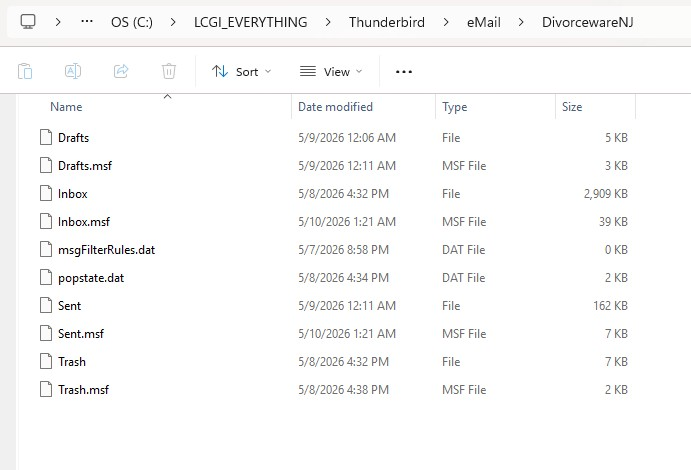
Art Lieberman மூலமாக திருத்தப்பட்டது
The message filters are kept in this file 'msgFilterRules.dat'
re :N:\LCGI_EVERYTHING\Thunderbird\eMail\DivorcewareNJ Do you have a 'msgFilterRules.dat' file that has a size in that location?
C:\LCGI_EVERYTHING\Thunderbird\eMail\DivorcewareNJ It looks like you did not use the default location for Mail. The hierachy of folders is somewhat lacking. The popstate.dat file is very small - it keeps a record of everything downloaded. The msgFilerRules is empty.
What have you got in this location: For Pop accounts the normal place on a Windows OS to store everything to do with Thunderbird - profiles, mail accounts, emails, calendar and address books etc would have this structure. So I'm wondering if this was the original location and data might be still available.
- C://Users/username/Roaming/Thunderbird/Profiles/profile name/Mail/mail accountname folder
We need to see images what you have in all the following:
- C://Users/username/Roaming/Thunderbird
In Thunderbird folder Open the 'profiles.ini' file using Notepad and post an image.
- C://Users/username/Roaming/Thunderbird/Profiles folder
post an image showing all the profile name folders on the Profiles folder
- C://Users/username/Roaming/Thunderbird/Profiles/profile name/Mail folder
post an image showing all the contents in the Mail folder - it should list all the pop mail accounts and the Local Folders folder.
- C://Users/username/Roaming/Thunderbird/Profiles/profile name/Mail/mail accountname folder
post an image showing all the contents of the 'mail account name' folder - it should list all the email mbox files etc including the Message filter rules and popstate.dat file.
what happens when you set 'server settings' Local Directory to point to that profile?
Many thanks to both of you. I appreciate your helpfulness.
I have figured out the two folders that I needed to restore: C:\LCGI_EVERYTHING\Thunderbird for the email C:\Users\art\AppData\Roaming\Thunderbird for the settings.
And I figured out what I messed up when I moved my email files to the N: drive... I didn't set Message Storage in Server Settings, and when I started Thunderbird, it couldn't find the data, and I started making things even worse.
It's working again!
Art
Art Lieberman மூலமாக திருத்தப்பட்டது