


I can’t access a website on Firefox
It is impossible to access a certain website using Firefox mobile. Edge, Chrome and safari work fine. I tried to turn protection off but it makes no difference. Why is this happening? Site is www.hlc.bike a large b2b distributor in the cycling world.
Been like this ever since I installed FF mobile.
All Replies (2)
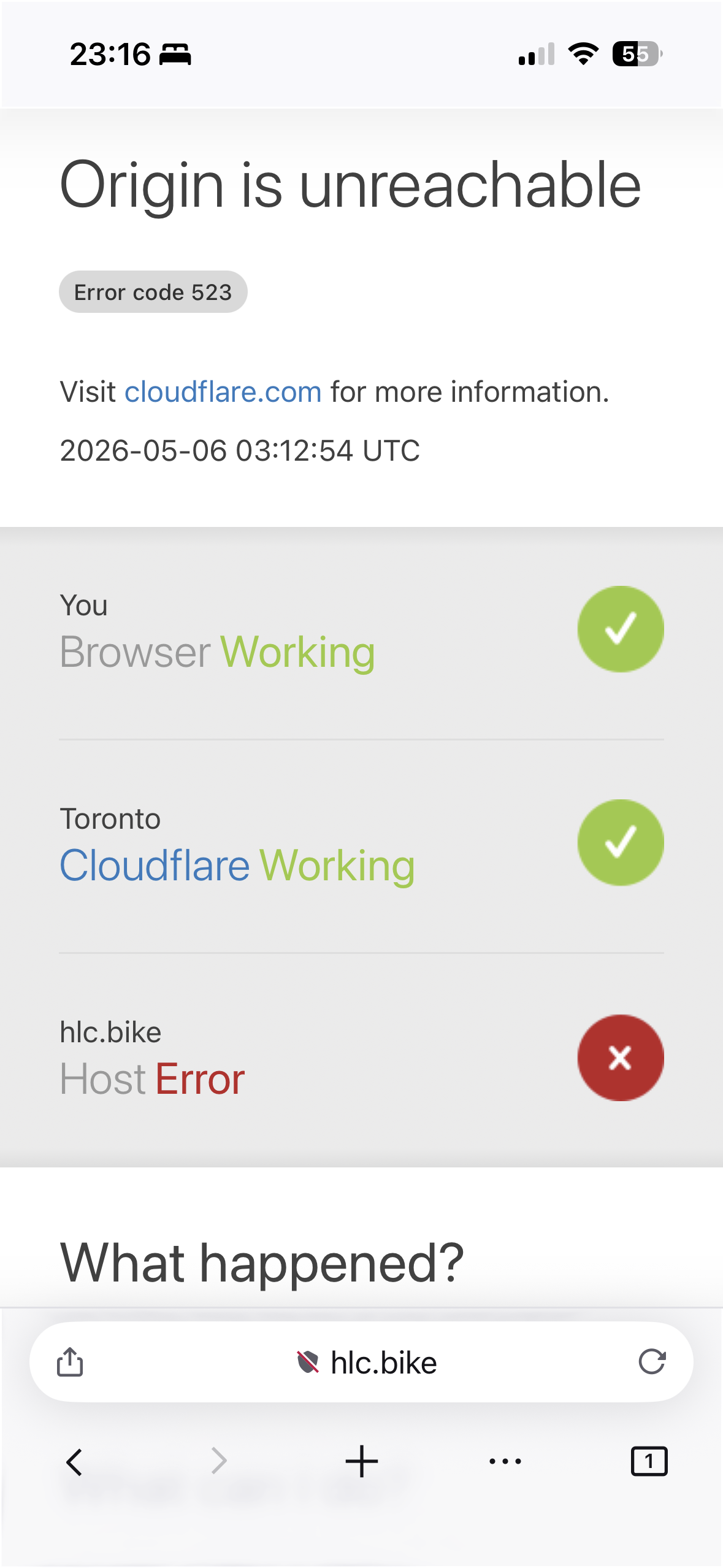
As the error diagram shows, the issue is not your browser apparently.
The connection according to the content delivery provider is broken between their cache, and the website's app origin. Basically it's not responding to them. Can the website be crashing based on your cookies or browser data? Plausible, but you'd need to get in touch with them reporting they have something broken. Can the origin be rejecting your connection based on being from Firefox iOS? Plausible, but doesn't look like it as I can open it just fine (see attachment). Might be ISP/IP based block? Might be, but if you can access from the same device immediately after that's also weird.
1. Try enabling "desktop site" mode from site menu — that completely masks that you're using Firefox iOS so there's no distinction from e.g. Safari to the opposite side, so they can't do any shenanigans based on the device.
2: See if using the site from private browsing mode makes any difference, to start with a fresh session.

I’ve tried clearing all cache etc. Uninstalled and reinstalled the app. Turning off all integrated protection. I do use ControlD for dns filtering. I turned it off and used default dns and I still get the issue. Going for desktop site doesn’t change anything either.
Private browsing doesn’t work either.