


Windows 10 reached EOS (end of support) on October 14, 2025. If you are on Windows 10, see this article.

Search Support

Avoid support scams. We will never ask you to call or text a phone number or share personal information. Please report suspicious activity using the “Report Abuse” option.

Learn More

Nachrichten konnten nicht in die Mailbox-Datei geschrieben werden.

  • 3 பதிலளிப்புகள்
  • 0 இந்த பிரச்னைகள் உள்ளது
  • Last reply by christ1
  • Open

Hi. I´m running thunderbird 150.0 under win10 an a HP2760p with 8 GB RAM and 155 GB of free SDD-space.

I´ve got the errormessage: "Nachrichten konnten nicht in die Mailbox-Datei geschrieben werden. Stellen Sie sicher, dass das Dateisystem Ihnen Schreibrechte einräumt und genügend Speicherplatz zur Verfügung steht, um die Mailbox zu kopieren."

That is: Unable to write mesages to the mailbox-file. Make shure to have writing rights according to the filesystem and enaugh space is available to copy the mailbox.

I can´t find a limitation to filesize. I deleted a lot of mails, the error persists. I updated from thunderbird 140 to 150.0. The error persists. I downloaded my emails on an win11 Laptop. The download stopped after a while with the same error.

What can I do ? Thanks in advance - Robin
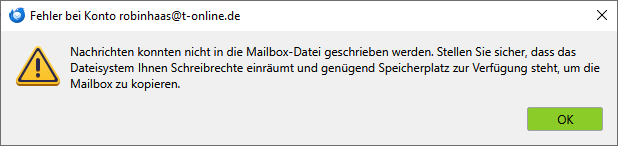
Hi. I´m running thunderbird 150.0 under win10 an a HP2760p with 8 GB RAM and 155 GB of free SDD-space. I´ve got the errormessage: "Nachrichten konnten nicht in die Mailbox-Datei geschrieben werden. Stellen Sie sicher, dass das Dateisystem Ihnen Schreibrechte einräumt und genügend Speicherplatz zur Verfügung steht, um die Mailbox zu kopieren." That is: Unable to write mesages to the mailbox-file. Make shure to have writing rights according to the filesystem and enaugh space is available to copy the mailbox. I can´t find a limitation to filesize. I deleted a lot of mails, the error persists. I updated from thunderbird 140 to 150.0. The error persists. I downloaded my emails on an win11 Laptop. The download stopped after a while with the same error. What can I do ? Thanks in advance - Robin
Attached screenshots

All Replies (3)

What is your anti-virus software?

Norton 360. Worked fine since years.

Try to start Windows 10 in safe mode with networking enabled.

Does the problem go away?

Windows safe mode disables anti-virus software. This is a troubleshooting step, not a solution.

கேள்வி எழுப்பு

You must log in to your account to reply to posts. Please start a new question, if you do not have an account yet.