


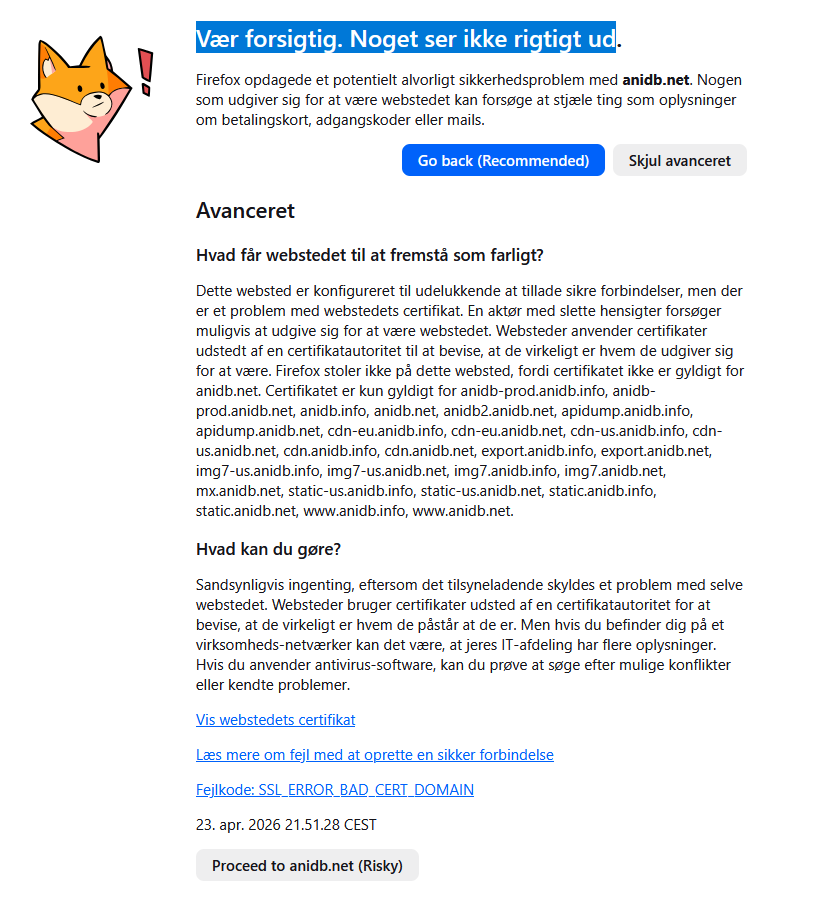
Be careful. Something doesn't look right

To be honest. Firefox is starting to be a big pain to use. I'm starting to see more and more of this screen where it say's "Be careful. Something doesn't look right" Even when i go to the advance and say proceed. Nothing happens and i'm getting no where. I know many of the sites don't have anything to do with asking for credit card, Scam or even having popup's. I test the sites in other browsers and there work without any issues. But Firefox is starting to lock me out of many sites due to this. How can i make this stop. As i used Firefox for many years.
The sample that is in the screenshot is a Anime data base that i have also used for years. But today shows this. But was working fine yesteday. What is going on and how can i fix it. So i can start using the browser that i love on the sites i want to.
தீர்வு தேர்ந்தெடுக்கப்பட்டது
Okey.. Think that i found the issue. Seems like Avast is making some odd conflicts with firefox. As it does not do so with other browsers. Seems to only affect Firefox. As Brave, Edge and Chrome has no issues with it. Guess i'll just use one of em to access the remaining site that does not work with firefox. Just to bad that there seems to be something wrong with it/conflicting with some software that i used for ages and only know have become an issue.
All Replies (6)
Hmm.. A hole week and nothing. Still skeeking help to solve the issue.
Hi
I can access anidb.net with no warning
The error in your screenshot, SSL_ERROR_BAD_CERT_DOMAIN, specifically means the name on the security certificate doesn't match the name in your address bar.
1. Clear Your Firefox Cache
- Go to Menu > Settings > Privacy & Security.
- In the Cookies and Site Data section, click Clear Data.
- Check Cached Web Content and click Clear.
2. Check for Antivirus "SSL/HTTPS Scanning or Web Shield"
3. Disable HTTPS-Only Mode (If Enabled)
4. Verify Your System Clock
Ensure your computer's date and time are correct.
George Kitsoukakis said
Hi I can access anidb.net with no warning The error in your screenshot, SSL_ERROR_BAD_CERT_DOMAIN, specifically means the name on the security certificate doesn't match the name in your address bar. 1. Clear Your Firefox Cache2. Check for Antivirus "SSL/HTTPS Scanning or Web Shield" 3. Disable HTTPS-Only Mode (If Enabled) 4. Verify Your System Clock Ensure your computer's date and time are correct. What do the security warning codes mean?
- Go to Menu > Settings > Privacy & Security.
- In the Cookies and Site Data section, click Clear Data.
- Check Cached Web Content and click Clear.
thx for your reply. I did all of that expect step 2. As i can't seem to find the option in the settings. Anyways unfortunally it did not work. Also tried using a VPN without it working. Altho i did something else. Made dns flush and also winsock reset and that did the trick. Altho there are still other sites that are still not working. But there do come up with other error's like SEC_ERROR_UNKNOWN_ISSUER The only thing i get from the help site that you linked is that the certification can't be confirmed. But i still can't get passed the risk/proceed Do you know any steps i can take to get passed that error. The SEC_ERROR_UNKNOWN_ISSUER that is.
Click the Advanced button
Look for the "Issuer" or "Verified by" field. (Alternatively, they can click the error code SEC_ERROR_UNKNOWN_ISSUER itself, which often reveals the certificate details).
Copy/paste exactly what it says
தீர்வு தேர்ந்தெடுக்கப்பட்டது
Okey.. Think that i found the issue. Seems like Avast is making some odd conflicts with firefox. As it does not do so with other browsers. Seems to only affect Firefox. As Brave, Edge and Chrome has no issues with it. Guess i'll just use one of em to access the remaining site that does not work with firefox. Just to bad that there seems to be something wrong with it/conflicting with some software that i used for ages and only know have become an issue.
This happens because Firefox is the only major browser that uses its own independent 'trust list' instead of relying on Windows. While Chrome and Edge automatically trust Antivirus 'Web Shield,' Firefox needs to be told it's okay to do so.