


How to revert to old Firefox Search Engine Field user interface?

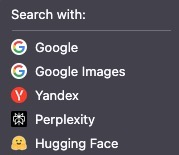
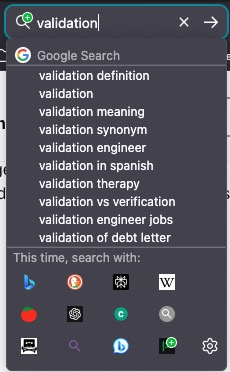
Firefox Search Field changed to a drop-down with Icon + Search Engine Name instead of the previous 3-6 icons on a row with Search Engine Name only appearing when you hover over the Search Engine icon? How do I change Firefox back to the old Search Engine field user interface?
Attached is the new UI which takes up too much screen space if you have a lot of Search Engines installed in the Search Engine Field. I'd like to revert to the old code. If the old code is no longer in Firefox, what version do I have to downgrade to in order to get that old user interface back?
தீர்வு தேர்ந்தெடுக்கப்பட்டது
For now you can revert to the previous layout of the search engine via about:config.
The new search bar widget is behind the "browser.search.widget.new" pref in about:config and got enabled in 149.
Read this answer in context 👍 0All Replies (3)
தீர்வு தேர்ந்தெடுக்கப்பட்டது
For now you can revert to the previous layout of the search engine via about:config.
The new search bar widget is behind the "browser.search.widget.new" pref in about:config and got enabled in 149.
Thank you. Problem solved. Incredibly frustrating when developers decide to change a user interface without giving users an easy way to option back to the old user interface. I'd probably abandon Firefox all together if this feature was killed.
There will likely come a time where the code gets cleaned up and the old code is removed, but for now this is still possible.
You can leave comments and submit feedback via "Help -> Share Ideas and Feedback" or visit this website.