


UNABLE to access the Firefox web browser
After the latest version was updated, Version 149.00.7, on my laptop, on 27 March 2026, the browser closed midway while I was working, and now I can no longer access Firefox.
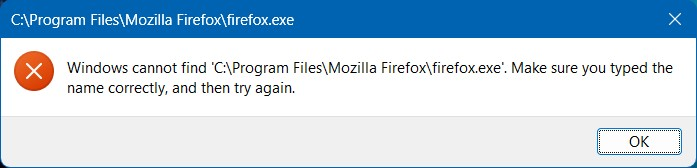
When I click on the Icon to access I keep getting the following error message as per the attachment:
I have uninstalled Firefox and re-installed it THREE TIMES already', but I still get the same error as before, as per the screen print provided.
I have even tried to install Firefox with custom settings, but then in order to proceed with the installation the ONLY button to proceed was the "UPGRADE" option.
I am at my wits end because this is totally unacceptable and the updated version obviously DOES NOT WORK!!!
Your urgent attention and prompt action in sorting this out will be appreciated, thanks.
Hettie
தீர்வு தேர்ந்தெடுக்கப்பட்டது
If you're done, mark this a resolved and have a nice day.
Read this answer in context 👍 1All Replies (3)

interesting...
What happens when go to that path in the error message and run firefox.exe?
Another test would be to try another version of Firefox (Beta,Dev,or Nightly)and see if you have the same issue. Make sure to install in a different path from your current install. https://www.mozilla.org/en-US/firefox/channel/desktop/
Still experience issues and I will try to uninstall same.
This can be resolved, thanks