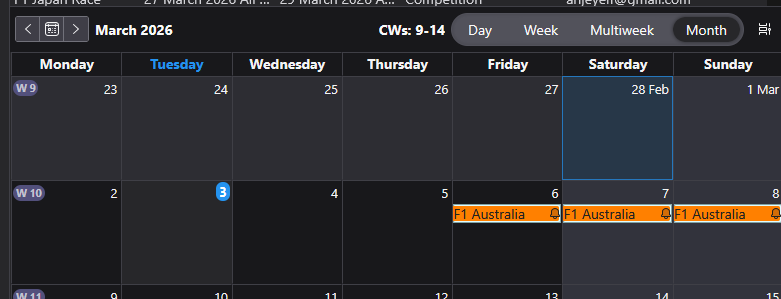
My Tbird ver 140.8.0esr shows 2026 Feb 29 which does not exist. what can I do?

I don't know what to do when February 29 is in my calendar, 2026 is not a leap year. I've found nothing to help me. I have the latest version if Thunderbird. Thanks
தீர்வு தேர்ந்தெடுக்கப்பட்டது
In using Windows 11 and version 140.8.0esr I'm not seeing an issue. I've posted an image below. It shows 28th feb 2026 followed by 1st March.
Can you please upload an image that shows the problem. Select the default 'Home' calendar Select 'Monthly' option Make sure we can see the section above the actual calendar, that says what selected and calendar itself shows part of feb and all of March. Basically upload image that shows same info as my image.
Where did you get the download of Thunderbird ?
eg: Windows App Store, or download from the official website here: https://www.thunderbird.net/en-US/thunderbird/all/
All Replies (1)
தீர்வு தேர்ந்தெடுக்கப்பட்டது
In using Windows 11 and version 140.8.0esr I'm not seeing an issue. I've posted an image below. It shows 28th feb 2026 followed by 1st March.
Can you please upload an image that shows the problem. Select the default 'Home' calendar Select 'Monthly' option Make sure we can see the section above the actual calendar, that says what selected and calendar itself shows part of feb and all of March. Basically upload image that shows same info as my image.
Where did you get the download of Thunderbird ?
eg: Windows App Store, or download from the official website here: https://www.thunderbird.net/en-US/thunderbird/all/