


I cannot log in Firefox account. It says I have to log out to log into my account
I cannot log in Firefox account. It says I have to log out to log into my account. All I wanted to do is to remove a phone I reset and gave away from my Firefox device logins, but everything quit working with all the AI chaos.
All Replies (5)
Thank you for answering.
My devices are logged into the Firefox browser. But I can no longer log into my Firefox/ Mozilla service account where I can see, or change my information. Before clicking on my icon in my Ff browser, I was taken to "Firefox Account" page, where I saw which devices were logged in, and when, I could add a new device, or log out that device I reset and gave away. I was able to easily take the no- longer- mine device off my google account list, but could not do so anymore with either Firefox, or Microsoft, because those links appear gone. More and more, software is changed, almost daily, as to take away our ability to monitor who is accessing our accounts, and we waste lots of time invasive AI in general, as it distacts with with long, rambles of randomly slopped together answers of outdated and inaccurate bits of of scraped texts, regardless of context. Again, I appreciate you helping me. WDHC.
WDHC மூலமாக திருத்தப்பட்டது
Thank you for clarifying! For me, it still works exactly as you described with Firefox and my Mozilla account.
What exactly happens when you try to open the page? A screenshot would help. Also, you should be able to get there by going to accounts.firefox.com and signing in.
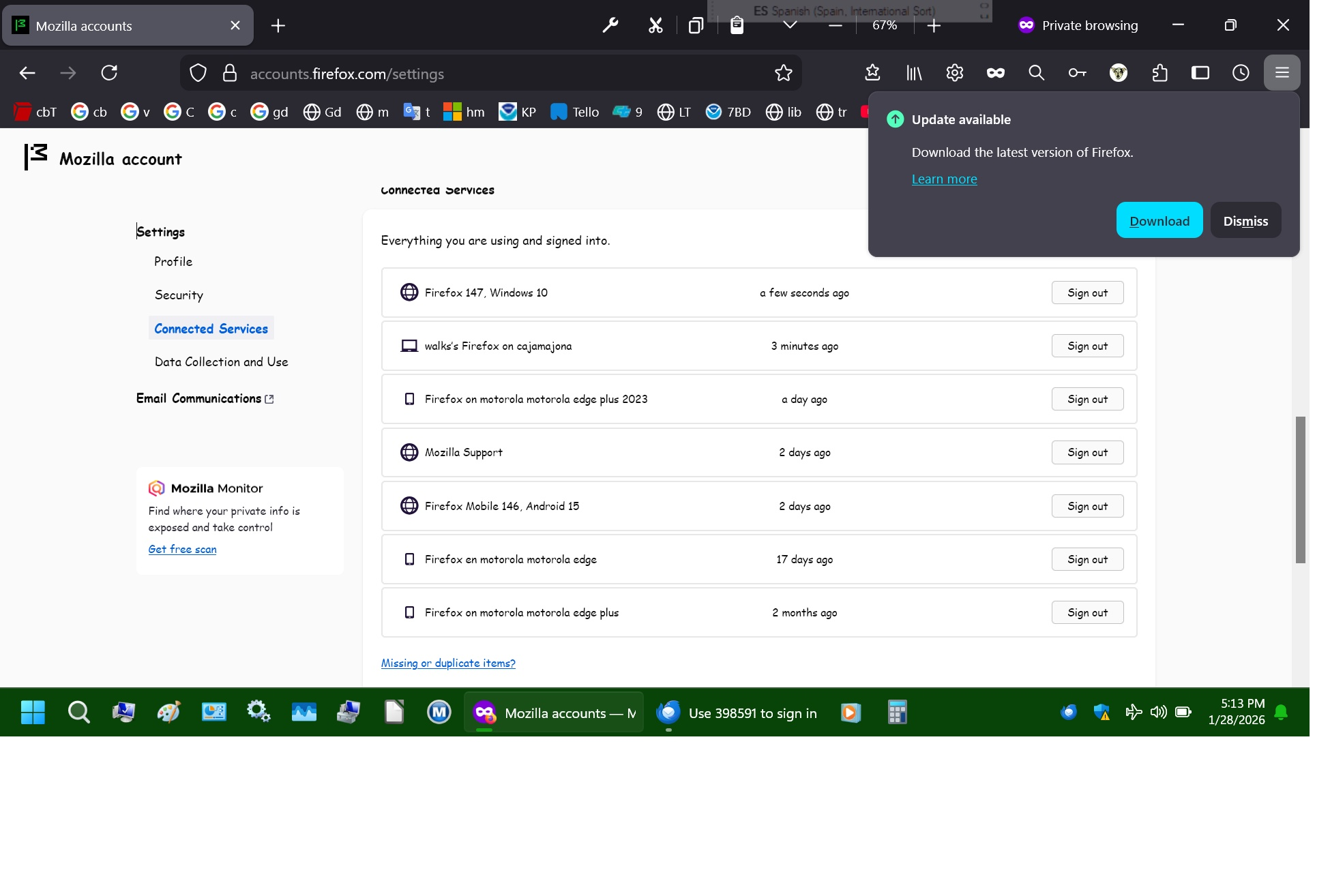
It got very interesting when I followed your link instead of clicking my profile icon in FF on either phone or W11. See photo. I assume the problem is that I have my old W10 computer that I keep offline, a much better computer for writing, etc. And a small W11 one I bought in 3/2025, to take with me and be online on. But FF is blocking all requests from obsolete devices, and my W11 by mistake? I aslo use Thunderbird for quick email download and offline reading. The first 2 entries are both my W11, received within seconds and the Did You Log in was on top. Checking on a phone in conversation style I probably did not scroll down far enough.
W11, Cajamajona, is a huge pain, as W11 won't transfer files without a modem and I live on the dark side of the digital divide. Nor will it even hook to my printer. Updates are a hardship and rarely succeed because of the lack of internet cable in the mountains. And as you can see, FF detects this, the W11 computer, as my W10 computer, Cajamajara, eventhough that one stays home. I have 2 phones with different signal capabilities and 2 old phones that take better photos, and video and have SD cards for easy transfer to my HD.
Thank you for helping. Any suggestions on convincing FF that Cajamajona is a W11?
WDHC மூலமாக திருத்தப்பட்டது
So, what you see is expected. Cajamajona is your device name, not the OS. (For example, I see WIN-OFVCBGBBO38.)
Also, Windows 10 may actually be Windows 11, since (as far as I know) Mozilla accounts are not able to differentiate between these two systems. (For privacy reasons, only the UA string is taken into account, which provides only Windows major version number, which is NT 10.0 for both Windows 10 and Windows 11.)
Do you face any other issue except for this visual bug with OS identification?
Denys மூலமாக திருத்தப்பட்டது