


Since update to 68.2.1 nothing is displayed in thunderbird
There is nothing displayed at all: no left side tree (imap accounts), nothing on the right (no messages). (The only open tab as no title with only the 'folder' icon) Menu bar does not open anything : Tools > Options does nothing for example.
Notice I tried the thunderbird "Save Mode" > nothing better... same problem.
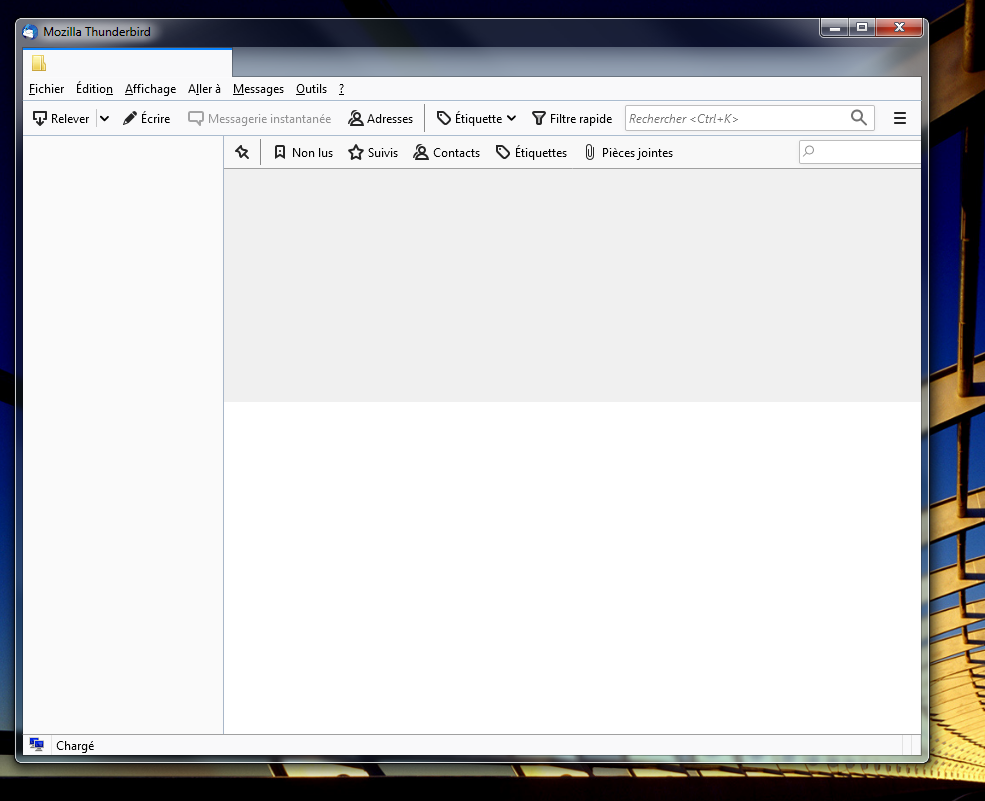
All Replies (7)
(I also tried a new install on the top of current version. No luck.)
OS: Windows 7 Ultimate 64 bits. Potential addons: "Signal Spam" (but I tried 'disable addons' within safe mode launch)
Help > Troubleshooting Information Click on 'About:Profiles' You will see profiles listed. The default will currently be a new one. Below you should see the old one. Click on 'Set as Default Profile' Exit Thunderbird
Wait a few moments for background processes to complete. Restart Thunderbird and see if it picks up the profile you selected.
Help > Troubleshooting Information does not open any window, like I said, major parts of the menu bar does not open any window...
Try this:
Exit Thunderbird.
In bottom search type : run select the 'Run.app'
Type: thunderbird.exe -P Note: there is a space after .exe before the -P click on OK
This should launch Profile Manager Select the original profile which might be simply called 'default' and not 'default release' etc.
select the checkbox to not ask at start up click on 'Start Thunderbird'
Toad-Hall மூலமாக திருத்தப்பட்டது
I'll try next time. I reverted to Thunderbird 60.9.0 (32bits) [fresh install over. works immediately]
What I can also notice is that my other computers (same OS...) does not suggest to upgrade to 68.2 at all ! They are stuck (hopefully) to 60.9.0 version so they are still working (I don't understand why it says "up to date" and not upgrading also to 68.2, but this is convenient for me as it still works).
upgrade to 60.9.1 . still works. I'll wait for the auto upgrade to 68.2 and see if it will occur again.