


Latest update stops me from opening my "privacy & security" tab in options

The other tabs work, but this new Options format doesn't allow me to open the "privacy & security" tabs. I don't want to uninstall and reinstall firefox because I worry that I'll lose my history, tabs and stored passwords. I have tried starting in safe mode, it didn't help.
தீர்வு தேர்ந்தெடுக்கப்பட்டது
In Firefox 56 you can set this pref to true on the about:config page to revert to the previous appearance of the Options/Preferences page.
- browser.preferences.useOldOrganization = true
Try to create a new profile to test if your current profile is causing the problem.
See "Creating a profile":
- https://support.mozilla.org/en-US/kb/profile-manager-create-and-remove-firefox-profiles
- http://kb.mozillazine.org/Standard_diagnostic_-_Firefox#Profile_issues
If the new profile works then you can transfer files from a previously used profile to the new profile, but be cautious not to copy corrupted files to avoid carrying over problems.
Read this answer in context 👍 2All Replies (5)
Start Firefox in Safe Mode to check if one of the extensions ("3-bar" menu button or Tools -> Add-ons -> Extensions) or if hardware acceleration is causing the problem.
- switch to the DEFAULT theme: "3-bar" menu button or Tools -> Add-ons -> Appearance
- do NOT click the "Refresh Firefox" button on the Safe Mode start window
- https://support.mozilla.org/en-US/kb/troubleshoot-firefox-issues-using-safe-mode
- https://support.mozilla.org/en-US/kb/troubleshoot-extensions-themes-to-fix-problems
You can check for problems with preferences.
Delete possible user.js and numbered prefs-##.js files and rename/remove the prefs.js file to reset all prefs to the default value including prefs set via user.js and prefs that are no longer supported in current Firefox releases.
You can use the button on the "Help -> Troubleshooting Information" (about:support) page to go to the current Firefox profile folder or use the about:profiles page.
- Help -> Troubleshooting Information -> Profile Directory:
Windows: Show Folder; Linux: Open Directory; Mac: Show in Finder - http://kb.mozillazine.org/Profile_folder_-_Firefox
None of this worked. As mentioned in my first comment, I've already tried starting in safe mode. And I've never had anything other than the default theme.
I found a "prefs" file and renamed it, but no luck.
Are you sure I can't uninstall and reinstall firefox while preserving my tabs, history, and saved passwords?
And are you sure this isn't a problem with the firefox update itself? It looks like a broken link to me, but of course I wouldn't know.
cor-el said
Start Firefox in Safe Mode to check if one of the extensions ("3-bar" menu button or Tools -> Add-ons -> Extensions) or if hardware acceleration is causing the problem.
- switch to the DEFAULT theme: "3-bar" menu button or Tools -> Add-ons -> Appearance
- do NOT click the "Refresh Firefox" button on the Safe Mode start window
You can check for problems with preferences. Delete possible user.js and numbered prefs-##.js files and rename/remove the prefs.js file to reset all prefs to the default value including prefs set via user.js and prefs that are no longer supported in current Firefox releases. You can use the button on the "Help -> Troubleshooting Information" (about:support) page to go to the current Firefox profile folder or use the about:profiles page.
- https://support.mozilla.org/en-US/kb/troubleshoot-firefox-issues-using-safe-mode
- https://support.mozilla.org/en-US/kb/troubleshoot-extensions-themes-to-fix-problems
- Help -> Troubleshooting Information -> Profile Directory:
Windows: Show Folder; Linux: Open Directory; Mac: Show in Finder- http://kb.mozillazine.org/Profile_folder_-_Firefox
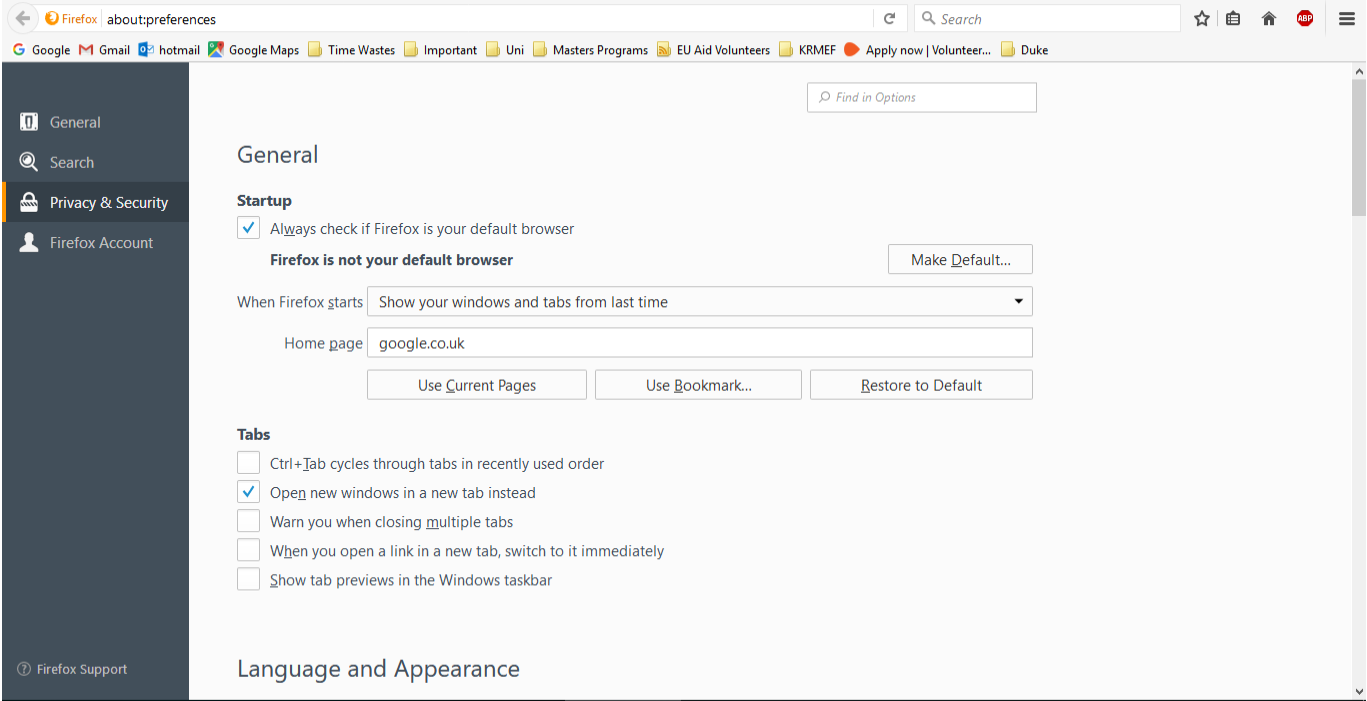
Open a blank tap and copy paste this in and go/enter about:preferences#privacy That should open the page. If it does not then everything else we suggest will possibly loose what you are looking to save. Though it is possible Corel may have some other ideas.
Have you tried Restoring your System before this happened ?
I have personally have had success in keeping everything when installing a Full version Installer (not the Stub version) over top of a install and it has kept everything. This is not a Supported Option and if you do so it is at your own risk. https://www.mozilla.org/en-US/firefox/all/ This should only be done as a last resort and again at your own risk.
தீர்வு தேர்ந்தெடுக்கப்பட்டது
In Firefox 56 you can set this pref to true on the about:config page to revert to the previous appearance of the Options/Preferences page.
- browser.preferences.useOldOrganization = true
Try to create a new profile to test if your current profile is causing the problem.
See "Creating a profile":
- https://support.mozilla.org/en-US/kb/profile-manager-create-and-remove-firefox-profiles
- http://kb.mozillazine.org/Standard_diagnostic_-_Firefox#Profile_issues
If the new profile works then you can transfer files from a previously used profile to the new profile, but be cautious not to copy corrupted files to avoid carrying over problems.
Pkshadow said
Open a blank tap and copy paste this in and go/enter about:preferences#privacy That should open the page. If it does not then everything else we suggest will possibly loose what you are looking to save. Though it is possible Corel may have some other ideas. Have you tried Restoring your System before this happened ? I have personally have had success in keeping everything when installing a Full version Installer (not the Stub version) over top of a install and it has kept everything. This is not a Supported Option and if you do so it is at your own risk. https://www.mozilla.org/en-US/firefox/all/ This should only be done as a last resort and again at your own risk.
Thanks very much, but the "about:preferences#privacy" was one of the first things I tried, and it didnt help. Luckily cor-el's "about:config" solution worked!
Thanks both for your help.