


How can Iremove your donation request on my home page?

I made a donation to Mozilla but the request for donations still appears on my home page every time I open up Firefox
தீர்வு தேர்ந்தெடுக்கப்பட்டது
Are you running Firefox in private browsing mode?
You posted with a user agent for a desktop Firefox version on Mac.
Can you confirm that this is a bout Firefox on a desktop computer?
All Replies (4)
Is this on your Mac? (Currently this post was slotted under iPad/iPhone; a moderator can move it for you.)
The payment processing site does not share data back to your browser, so you need to close that ad manually. You should find a close button to the upper right of the ad. I have attached a screen shot illustrating. It took me 3 tries, but I don't know whether that is typical.
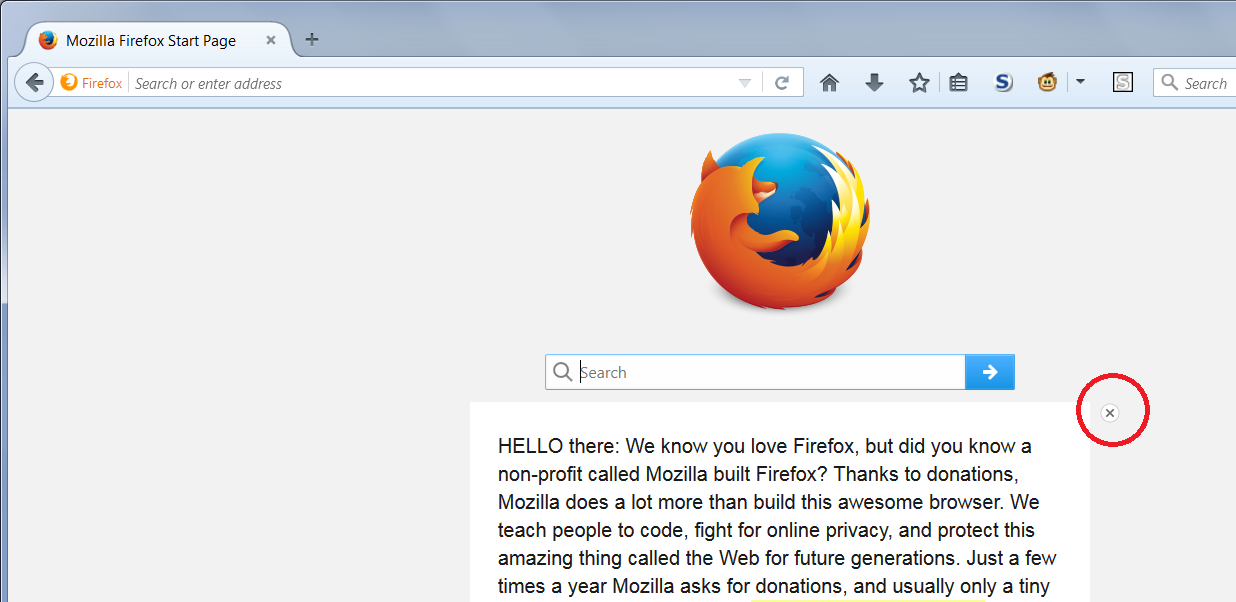
I clicked on the x icon on the upper right-hand corner of the ad - to no avail. It does not go away.
I would appreciate it if you could figure out how to get rid of this.
தீர்வு தேர்ந்தெடுக்கப்பட்டது
Are you running Firefox in private browsing mode?
You posted with a user agent for a desktop Firefox version on Mac.
Can you confirm that this is a bout Firefox on a desktop computer?
Magic! The issue has been resolved. Thanks!